
This page provides you with information on date and time handling across APIs.
Capillary follows a consistent model for handling date and time values across APIs. This ensures predictable behaviour for integrations across regions and clusters.
ISO-compliant fields across APIs
Capillary APIs return and accept date and time fields in ISO 8601 format.
yyyy-MM-ddTHH:mm:ssXXXExamples:
2025-12-16T14:30:45Z
2025-12-16T14:30:45+05:30
Where a legacy field does not follow ISO 8601, an additional *ISO shadow field is provided alongside the original for backward compatibility. For integrations, always use the ISO-formatted field.
| Field | Behavior |
|---|---|
ledgerCreatedDate | Legacy format retained |
ledgerCreatedDateISO | ISO 8601 representation |
For Promotion APIs, the timeZoneName field accepts a timezone value in IANA format (for example, Asia/Shanghai) and enables solving complications that arise during Daylight Saving Time (DST) transitions. This value is returned in subsequent GET APIs.
API timezone behaviour summary
| API type | Timezone handling | Notes |
|---|---|---|
| Selected POST / PUT APIs | Accept date-time values in ISO 8601 format. | For legacy fields that did not follow ISO format, additional *ISO shadow fields are provided. Existing fields remain unchanged for backward compatibility. Example: startOnISO in the Badges creation API. |
| Selected POST / PUT APIs | Accepts timezone value in IANA format . For example, Asia/Shanghai. | This value records the timezone used during entity creation. It is stored and returned in subsequent GET APIs (for example, Get Target Groups). This enables solving the complications that arise during DST transitions. |
| GET APIs | All date-time fields, including those of extended fields, are returned in the server timezone. | Responses use ISO 8601 format (yyyy-MM-ddTHH:mm:ssXXX). Examples: 2025-12-16T14:30:45Z, 2025-12-16T14:30:45+05:30 |
Offset preservation in behavioural events and transactions
When a transaction or behavioural event is submitted with a timezone offset, Capillary extracts and stores the offset alongside the event. This preserved offset is returned in subsequent GET responses, allowing downstream systems to reconstruct the original local time of the event.
For transactions, the offset is extracted from the billing date-time and returned as billingTimeInputOffset. For behavioural events, it is returned as eventDateTimeInputOffset. In both cases, the offset is only stored when it is present in the input.
Notes
- If you do not include a timezone offset, the system treats the value as being in server timezone and stores it as provided. For example, 2026-03-25T09:00:00 is stored as 2026-03-25T09:00:00 in server timezone.
- Autogenerated timestamps such as audit log entries and system-created dates are handled internally. You do not need to provide an offset for these.
| Input scenario | Transactions (billingTimeInputOffset) | Behavioural events (eventDateTimeInputOffset) |
|---|---|---|
Input includes offset (for example, +07:00) | Yes | Yes |
| Input has no offset | No | No |
Input offset is +00:00 or Z | Yes (+00:00) | Yes (+00:00) |
| Offset is null or empty | No | No |
For transactions, if the billing date includes an offset and you also manually send event_input_date_offset, the system ignores the manually provided value. If the billing date has no offset and you manually provide event_input_date_offset, the system uses the provided value.
For behavioural events, eventDateTimeInputOffset is system-generated. If you send it manually, the API rejects the request with HTTP 908.
Epoch milliseconds in event notifications
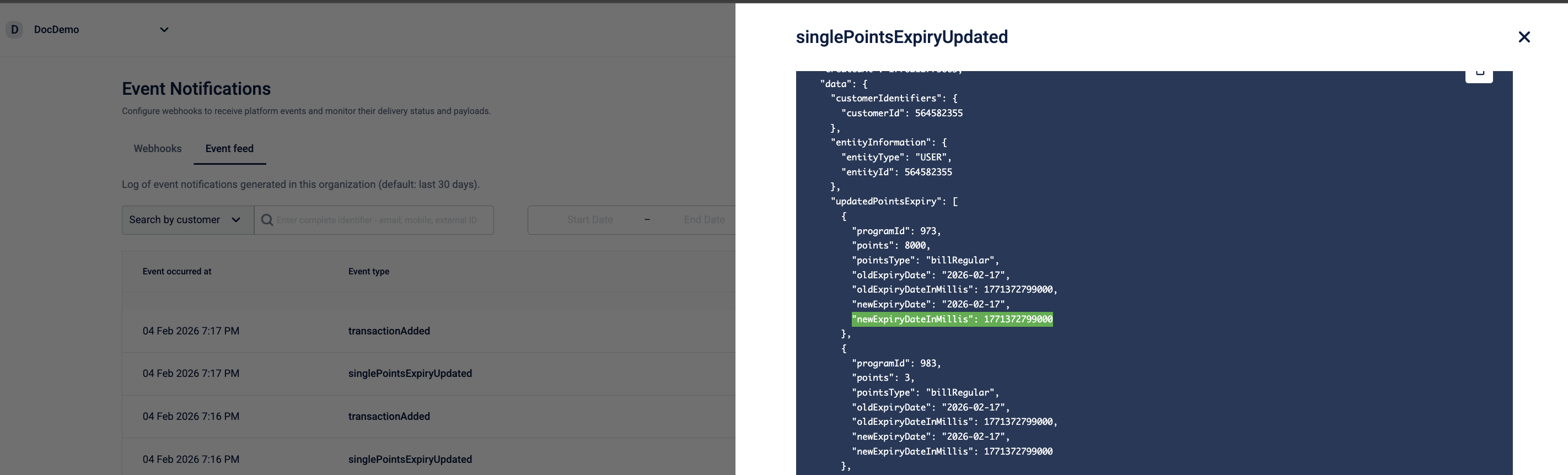
In event notifications, date and time values are standardised using epoch milliseconds.
- If a date-time field is already available in milliseconds (for example,
1761728400000), no changes are made. - If a date-time field is not available in milliseconds, a new shadow field is added to provide the same value in milliseconds.
The shadow field uses the <fieldName>InMillis naming convention.
Example
If an event includes a date-time field in a non-millisecond format:
expiryAt": "2025-12-31T23:59:59+05:30
A corresponding shadow field is added:
expiryAt": "2025-12-31T23:59:59+05:30,
expiryAtInMillis": 1767205799000
Timezone resolution for Loyalty, Points, Coupons, and Promotions
For modules like Loyalty, Points, Coupons, and Promotions, transaction times are recorded based on the timezone of the store where the transaction happened (follows Till → Store → Zone → Org hierarchy). This is the standard behavior for all new organizations on the platform.
For older organizations, the system used a different rule: it would pick whichever timezone was further ahead in time between the store and the server. This means some transactions were recorded in store time and others in server time, depending on the store's location, leaving the data inconsistent.
For older organizations, switching to the new behavior is handled through a separate configuration. Because the system will start reading all old records as if they were stored in store time, even if they weren't, this change requires careful evaluation. To enable this, raise a ticket with the Capillary Product Support team. They will assess the organization's data history before making the change.