
When you create a loyalty promotion through the UI, the qualifying conditions defined are internally structured into a format called Expression JSON, or expJSON.
When using the Loyalty Promotions API to create or update a promotion programmatically, you must provide the expJSON field directly. Understanding this structure will help you define any rule or condition for a loyalty promotion without depending on the UI.
The expJSON field is required when creating activity-based promotions and this includes single-activity, milestone-based, and streak-based promotions. Broadcast promotions do not use qualifying conditions and therefore do not require an expJSON.
UI conditions and expJSON
Each condition you configure in the UI maps directly to a specific JSON structure. The easiest way to understand expJSON is to see what the UI condition builder produces behind the scenes.
No qualifying condition
When no qualifying condition is added, the activity applies to all transactions and the expJSON evaluates to a constant true value.
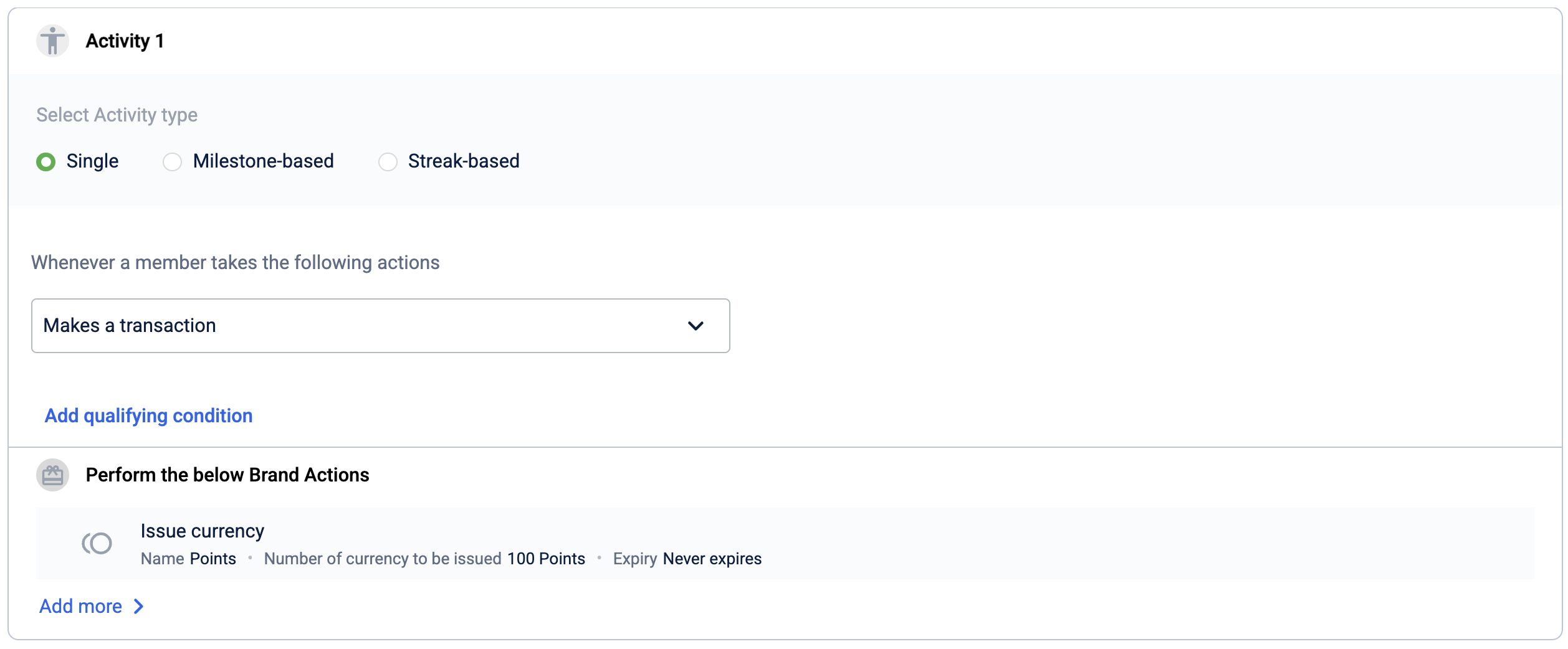
{
  "arity": "literal",
  "type": "boolean:primitive",
  "value": "true"
}
A single condition
When you add one condition, for example requiring the transaction value to be greater than 1000, the expJSON becomes a comparison operation between a transaction field and a fixed number.
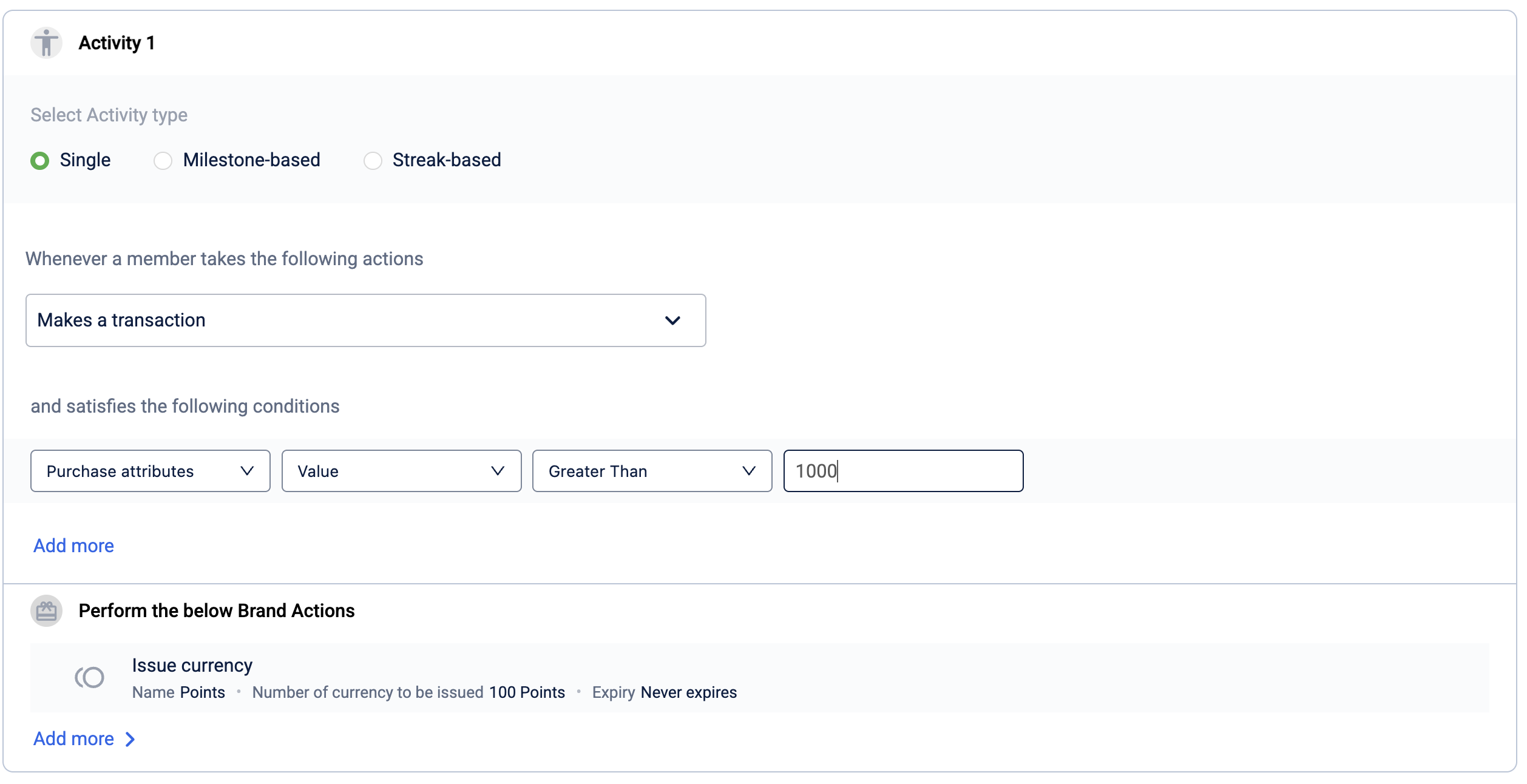
{
  "arity": "binary_operation",
  "type": "boolean:primitive",
  "value": ">",
  "operands": [
    {
      "arity": "object_dereference",
      "type": "real:object:primitive",
      "operands": [
        {
          "arity": "name",
          "type": "tx:object:primitive",
          "value": "currentTxn"
        },
        {
          "arity": "name",
          "type": "real:object:primitive",
          "value": "value"
        }
      ]
    },
    {
      "arity": "literal",
      "type": "number:primitive",
      "value": "1000"
    }
  ]
}
Explanation of the JSON from top to bottom:
- The root node is a
binary_operationwith"value": ">"this is the Greater Than operator selected in the UI. - Its first operand is an
object_dereferencethis is the UI's Purchase attributes > Value selection, which reads thevaluefield from the current transaction object (currentTxn). - Its second operand is a
literalwith"value": "1000"this is the number 1000 entered in the UI.
Multiple conditions combined with AND
When you add more than one condition using Add more, all conditions are joined with a logical AND. Every condition must be true for the promotion to apply.
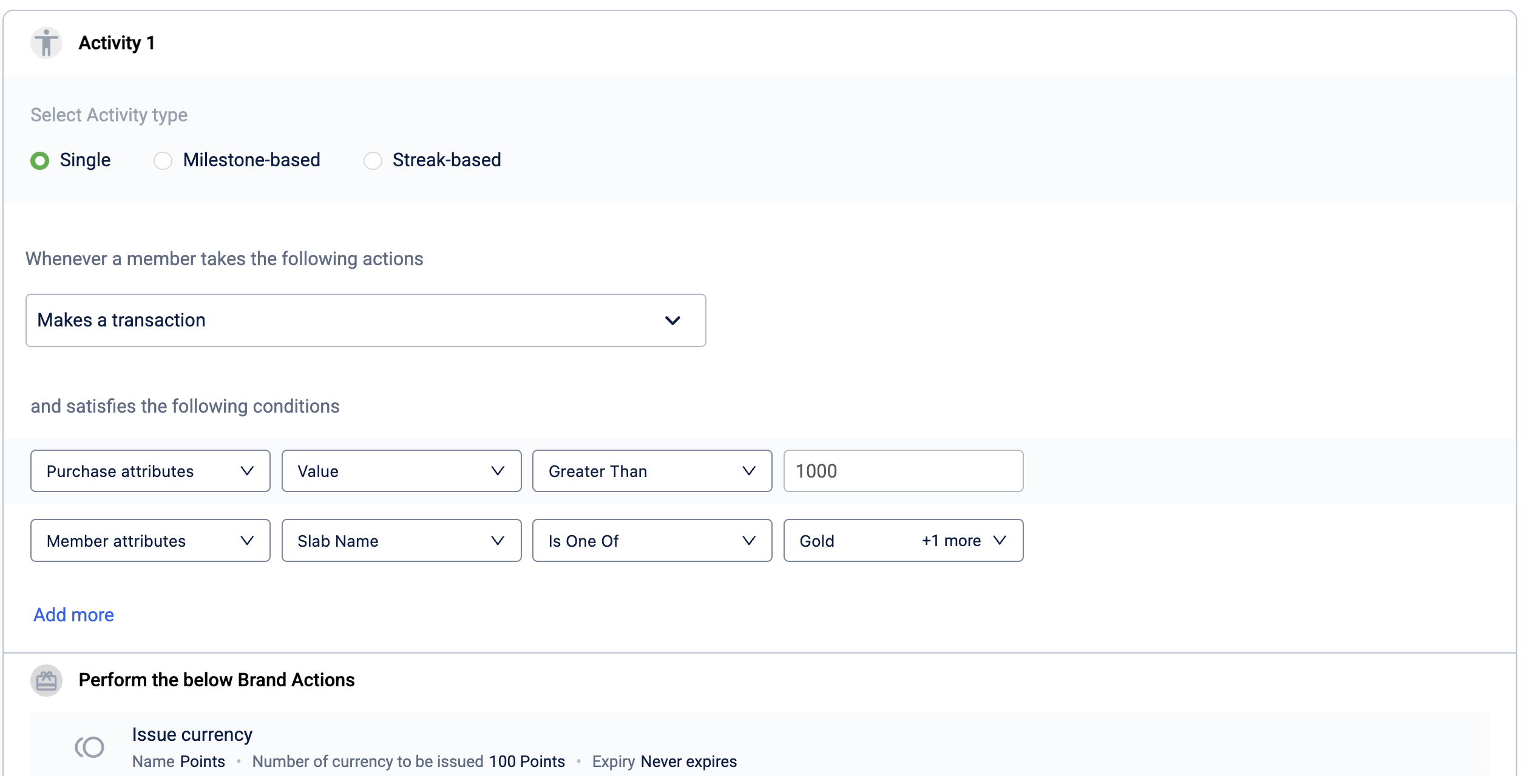
{
  "arity": "binary_operation",
  "type": "boolean:primitive",
  "value": "&&",
  "operands": [
    {
      "arity": "binary_operation",
      "type": "boolean:primitive",
      "value": ">",
      "operands": [
        {
          "arity": "object_dereference",
          "type": "real:object:primitive",
          "operands": [
            {
              "arity": "name",
              "type": "tx:object:primitive",
              "value": "currentTxn"
            },
            {
              "arity": "name",
              "type": "real:object:primitive",
              "value": "value"
            }
          ]
        },
        {
          "arity": "literal",
          "type": "number:primitive",
          "value": "500"
        }
      ]
    },
    {
      "arity": "method_call",
      "type": "boolean:primitive",
      "operands": [
        {
          "arity": "object_dereference",
          "type": "string:object:primitive",
          "operands": [
            {
              "arity": "name",
              "type": "customer:object:primitive",
              "value": "currentCustomer"
            },
            {
              "arity": "name",
              "type": "string:object:primitive",
              "value": "slabName"
            }
          ]
        },
        {
          "arity": "name",
          "type": "anonymous:function:primitive",
          "value": "isOneOf"
        },
        {
          "arity": "literal",
          "type": "string:object:primitive",
          "value": "Gold"
        },
        {
          "arity": "literal",
          "type": "string:object:primitive",
          "value": "Sapphire"
        }
      ]
    }
  ]
}
Reading through this JSON:
- The root node is a
binary_operationwith"value": "&&"this is the logical AND joining the two conditions. - The first operand (left branch) is the
currentTxn.value > 500check, identical in structure to the single-condition example above. - The second operand (right branch) is a
method_call. This is how Is One Of works in the UI. It calls theisOneOfmethod oncurrentCustomer.slabName, passing each selected tier ("Gold","Sapphire") as a separate literal operand.
How expJSON is structured
An expJSON is a tree of nodes. Each node represents one piece of the condition logic, and nodes can contain other nodes (called operands) to build up more complex expressions.
Every node has the following fields:
| Field | Data type | Required | Description | Example |
|---|---|---|---|---|
arity | String | Yes | The role this node plays in the expression. Determines how the node is evaluated. See Arity values for the full list. | "arity": "binary_operation" |
type | String | Yes | The data type of the value this node produces. For example, boolean:primitive for a true/false result, or number:primitive for a numeric value. See Type values for the full list. | "type": "boolean:primitive" |
value | String | Conditional | The actual value for this node. Used for literal and name nodes. For binary_operation nodes, this is the operator symbol (for example, >, ==, &&). Not used in object_dereference nodes. | "value": ">" |
operands | Array of nodes | Conditional | The child nodes that this node operates on. Required for binary_operation, unary_operation, object_dereference, and method_call nodes. Not used in literal nodes. | "operands": [{ ... }, { ... }] |
Note:The outermost node in an
expJSONmust always evaluate to aboolean:primitive. The promotions engine uses this final true/false result to decide whether the condition is met.
Arity values
The arity field defines the structural role of a node.
| Arity | Description | Has value? | Has operands? |
|---|---|---|---|
literal | A constant value, such as a fixed number, string, or true/false. | Yes | No |
name | A reference to a variable (such as currentTxn) or a property name (such as value). | Yes | No |
binary_operation | An operation that takes exactly two operands and applies an operator between them. The value field holds the operator symbol. | Yes | Yes (exactly 2) |
unary_operation | An operation that takes a single operand, such as logical NOT. | Yes | Yes (exactly 1) |
object_dereference | Accesses a property on an object. The first operand is the object; the second operand is the property name. | No | Yes (exactly 2) |
method_call | Calls a method on an object with optional arguments. The first operand is the object, the second is the method name, and any additional operands are the arguments. | No | Yes (2 or more) |
Type values
The type field describes the data type of the value a node produces.
| Type | Description |
|---|---|
boolean:primitive | A true/false value. The root node of an expJSON must always be this type. |
number:primitive | A generic numeric value. Used for literal numbers in conditions. |
integer:number:primitive | A whole number (integer). |
real:object:primitive | A decimal (floating-point) number, used for monetary amounts and other fractional values. |
string:object:primitive | A text string. |
tx:object:primitive | The current transaction object (currentTxn). |
transaction:object:primitive | An alias for the current transaction object (currentTransaction). |
customer:object:primitive | The current customer object (currentCustomer). |
store:object:primitive | The current store object (currentStore). |
Context objects and their fields
When building conditions that reference live data, such as the amount of the current transaction, you use context objects. These are pre-defined variables available during promotion evaluation.
currentTxn / currentTransaction
Represents the transaction that triggered the promotion evaluation.
| Field | Type | Description |
|---|---|---|
value | real:object:primitive | The net monetary value of the transaction. |
grossAmount | real:object:primitive | The gross amount of the transaction before discounts. |
discount | real:object:primitive | The total discount applied to the transaction. |
basketSize | integer:number:primitive | The number of distinct line items in the transaction. |
totalQty | integer:number:primitive | The total quantity of all items in the transaction. |
date | date:object:primitive | The date and time of the transaction. |
tenderIncludes | boolean:primitive | Checks whether the transaction includes a specific tender (payment method) code. |
tenderSum | real:object:primitive | The sum of amounts paid using tenders matching a regex pattern. |
basketIncludes | boolean:primitive | Checks whether the basket contains an item matching a regex pattern. |
categorySum | real:object:primitive | The total value of items belonging to a category matching a regex pattern. |
categoryCount | integer:number:primitive | The number of distinct items in a category matching a regex pattern. |
categoryQuantity | integer:number:primitive | The total quantity of items in a category matching a regex pattern. |
brandIncludes | boolean:primitive | Checks whether the basket contains an item from a brand matching a regex pattern. |
brandSum | real:object:primitive | The total value of items from a brand matching a regex pattern. |
brandCount | integer:number:primitive | The number of distinct items from a brand matching a regex pattern. |
brandQuantity | integer:number:primitive | The total quantity of items from a brand matching a regex pattern. |
currentLineItem
Represents an individual line item within the transaction. Use this for item-level conditions.
| Field | Type | Description |
|---|---|---|
value | real:object:primitive | The monetary value of the line item. |
discount | real:object:primitive | The discount applied to the line item. |
code | string:object:primitive | The item code or SKU. |
quantity | integer:number:primitive | The quantity of this item in the transaction. |
categoryMatches | boolean:primitive | Checks whether the item's category matches a given regex pattern. |
brandMatches | boolean:primitive | Checks whether the item's brand matches a given regex pattern. |
currentCustomer
Represents the member associated with the transaction.
| Field | Type | Description |
|---|---|---|
slabName | string:object:primitive | The name of the member's current loyalty tier (slab). |
slabNumber | integer:number:primitive | The numeric index of the member's current loyalty tier. |
currentPoints | real:object:primitive | The member's current points balance. |
lifetimePoints | real:object:primitive | The total points earned by the member across their lifetime. |
lifetimePurchase | real:object:primitive | The total purchase value across the member's lifetime. |
joinDate | date:object:primitive | The date the member enrolled in the loyalty programme. |
numberOfVisits | integer:number:primitive | The total number of store visits recorded for the member. |
numberOfTxns | integer:number:primitive | The total number of transactions made by the member. |
avgSpendPerVisit | real:object:primitive | The member's average spend per visit. |
avgBasketSize | integer:number:primitive | The member's average basket size across transactions. |
slabChangeDate | date:object:primitive | The date the member's loyalty tier last changed. |
slabExpiryDate | date:object:primitive | The date on which the member's current loyalty tier expires. |
loyaltyType | lstring:string:object:primitive | The loyalty type of the member (for example, LOYAL, NON_LOYAL). |
currentStore
Represents the store where the transaction occurred.
| Field | Type | Description |
|---|---|---|
name | string:object:primitive | The name of the store. |
code | string:object:primitive | The unique code identifying the store. |
Operators
For binary_operation nodes, the value field specifies the operator. The available operators depend on the types of the operands.
| Operator | Applicable types | Description |
|---|---|---|
> | Number | Greater than |
< | Number | Less than |
>= | Number | Greater than or equal to |
<= | Number | Less than or equal to |
== | Number, String | Equals |
!= | Number, String | Not equals |
&& | Boolean | Logical AND: both conditions must be true |
|| | Boolean | Logical OR: at least one condition must be true |