
The Cart Promotion APIs let you create, manage, and evaluate promotions that scan customer carts at checkout. Use these APIs to automate rewards, including discounts, free items, or bundle pricing based on spend amount, item count, brands, and payment methods.
What can cart promotion do?
You can use the Cart Promotion APIs to:
- Create various promotion types: You can set up rewards based on how they are triggered, such as automatically for your customers, via manual code entry, or as earned rewards.
- Define trigger conditions: You can add conditions based on the cart subtotal, the number of items, specific product categories, or the customer's payment method.
- Apply rewards: You can set the promotion to issue benefits such as percentage or fixed discounts, combo offers, or free products.
- Set usage limits: You can control how many times a promotion can be used by a single customer, within one cart, or across the entire promotion period.
- Manage how promotions stack: You can decide which promotions can be used together and which one gets applied first when multiple rewards are available.
- Restrict where and when: You can limit availability to specific stores or regions, and set specific days or hours when your promotion is active.
What are the types of cart promotions?
| Promotion Type | How it Works |
|---|---|
| POS | Applied automatically at checkout for eligible customers. You don't need the customer to take any manual action. |
| CUSTOMER | You require the customer to actively opt in or join the offer before the promotion becomes active for them. |
| CODE | Your customer triggers the reward by manually entering a specific promo code during the checkout process. |
| EARNING | You set a goal that the customer must first complete to "earn" the promotion before they can redeem it. |
| REWARD | You issue this directly to a specific customer or segment. It remains invisible at checkout until you have officially issued it to them. |
How is the cart promotion structured?
Every cart promotion is built from three functional components:
- Type: You can define the target and issuance of your cart promotion, such as identifying a loyalty member at checkout or requiring a customer to enter a specific code.
- Condition: You can establish the cart context needed to trigger the cart promotion, such as requiring specific product combinations, such as buying a laptop and a mouse together or a particular payment mode like using a VISA card.
- Action: You can specify the benefit the cart promotion provides, such as a monetary discount on the total cart value, a free product, or a fixed price for a bundle.
Notes
- Tender logic: A
TENDERcondition must always be paired with aTENDERaction.- Action constraints:
FIXED_PRICEactions are only valid withPRODUCTorCOMBO_PRODUCTconditions.- Cart locking: Temporarily reserving a promotion is disabled by default. You can create a JIRA ticket to enable
isLockingEnabled.
How does evaluating carts and redeeming cart promotions work?
Before a promotion is applied, your system must check the cart's eligibility. Once the customer is ready to pay, you can finalise the promotion using one of two redemption strategies.
Identifying the transaction source
To ensure the correct store gets credit for a sale, the system identifies the "till" using these methods:
- You can specify a till code by including the
X-CAP-API-ATTRIBUTION-TILL-CODErequest header. - If no header is provided, the system identifies the till using the OAuth or basic Auth credentials provided.
Choosing your redemption strategy
Your organization's redemption behavior is set at the backend level. Contact your platform administrator to enable the strategy that best fits your technical workflow.
Strategy 1: Real-time validation (During the sale)**
This is the most secure method. You validate the cart first and then submit the transaction with a unique ID.
- Call the Evaluate API, with the cart contents, including any promo codes or payment vouchers the customer wants to apply. The cart can be evaluated even if the customer is not yet identified. The system returns the eligible promotions along with a unique
evaluationId. - Pass the
evaluationIdinto the Transaction V2 API to finalise the sale. The system validates that the promotions being redeemed match exactly what was evaluated before the transaction.
Strategy 2: Post-transaction reporting (After the sale)**
This method is more flexible and allows you to report applied promotions after the customer has already paid. You should enable the strategy REDEMPTION_WITHOUT_CART_EVALUATION within your org.
Evaluate: You can still use the Evaluate API to check for active promotions, but the evaluationId is not required for the redemption step.
- Redeem: Once the transaction is complete, report the applied promotions using the Redemptions API. You can identify the customer using either their InTouch ID or an external identifier such as a mobile number or email.
Stacking and Ranking
When multiple promotions are valid for a single transaction, stacking rules and priority settings determine which promotions are applied and in what order.
Stacking behaviour
Each promotion has a stacking setting that controls whether it can be applied with other promotions on the same cart.
| Setting | How it works | When to use |
|---|---|---|
| Exclusive (stacking disabled) | If this promotion is applied, no other promotions can be applied to the cart. | Use for high-value offers like "Flat 50% Off Everything" where additional discounts are not intended. |
| Stackable (stacking enabled) | Other applicable promotions can be applied alongside this one. | Use for smaller incentives like "Free Shipping" that should combine with other discounts. |
When exclusive and stackable promotions qualify at the same time, the exclusive promotion takes precedence and blocks all others from being applied, regardless of their individual stacking settings.
When multiple exclusive promotions qualify, only one can be applied. The system uses the promotion ranking order below to determine which exclusive promotion wins.
When multiple stackable promotions qualify, all of them are applied. The ranking order determines the sequence in which each discount is calculated — this matters because some discounts are applied to the original cart value, while others are applied to the already-discounted amount.
Promotion ranking order
When the system must choose between promotions — either because stacking is disabled or to determine the order of application — it evaluates them in the following priority order:
1. Segmented promotion (Highest priority) Targets a specific, pre-defined customer group. Because this promotion was deliberately configured for a precise audience, it is treated as the most intentional and takes precedence over all other types.
2. Reward The customer spent loyalty points or currency to acquire this promotion. Because the customer has already given up something of value to hold it, the system honours it before considering promotions they received passively.
3. Code-linked The customer actively typed in a promo code at checkout, signalling deliberate intent to use that specific offer. This explicit action gives it higher priority than promotions applied automatically.
4. Earliest expiry Among promotions that are otherwise equal in priority, the one expiring soonest is applied first. This prevents a customer from losing a nearly-expired offer because a longer-lived one was picked instead.
5. Maximum discount (Lowest priority) If no other differentiator applies, the promotion that gives the customer the greatest monetary saving is chosen. This acts as the final tiebreaker and ensures the customer always gets the best available value when all else is equal.
Note:
The ranking order determines which promotion is applied when multiple promotions qualify and only one can be applied. When stacking is enabled, multiple promotions can be applied together and ranking controls the order in which they are evaluated, not which ones are excluded.
How to create a cart promotion: API workflow
The sequence of calls depends on the promotion type. Use the table below to determine the correct flow for your use case.
| Promotion Type | API Call Sequence |
|---|---|
| POS / CUSTOMER (Auto) | Create → Evaluate → Redeem |
| CUSTOMER (Opt-in) | Create → Issue → Evaluate → Redeem |
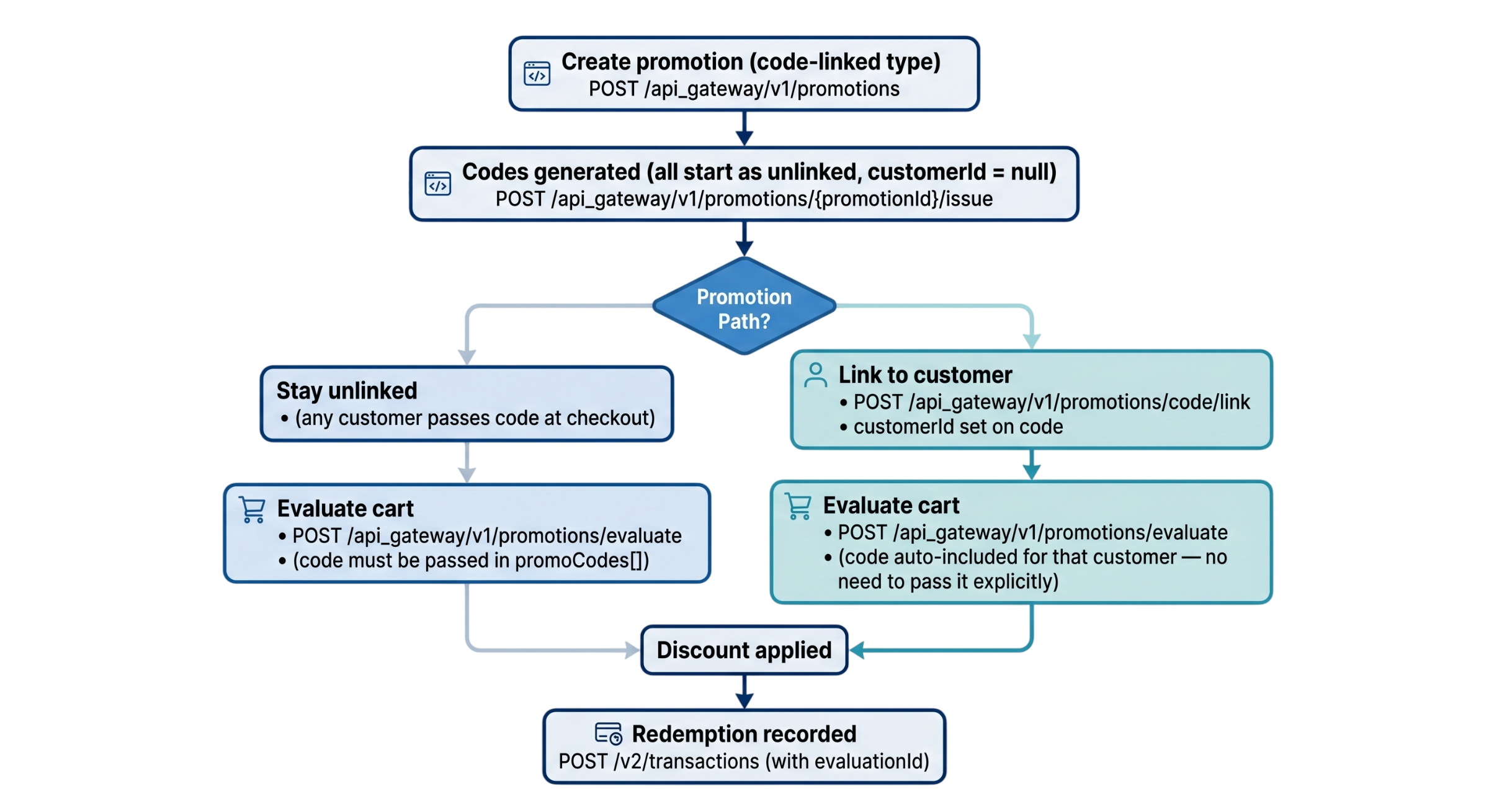
| CODE | Create → Issue codes → Link code to customer (optional) → Evaluate → Redeem |
| EARNING | Create → Earn → Evaluate → Redeem |
| REWARD | Create → Issue → Evaluate → Redeem |
Step 1: Create (Required for all)
Define the promotion's core logic. A single POST /api_gateway/v1/promotions call sets the conditions, actions, and limits.
Step 2: Issue (CODE, REWARD, and Opt-in CUSTOMER)
For CODE types, you must generate codes via the Issue API before they can be used. For REWARD types, the promotion remains invisible at checkout until it is issued to the customer or segment.
Step 3: Earn (EARNING only)
Use POST /api_gateway/v1/promotions/{promotionId}/earn to grant the promotion to customer. For bulk operations, use the /earn/bulk endpoint.
Step 4: Evaluate (Required for all)
Call POST /api_gateway/v1/promotions/evaluate with cart contents. The API returns the applicable discounts and a unique Base64 identifier string per promotion.
Step 5: Redeem (Required for all)
Submit the redemption via the Transaction V2 API or redemption API endpoint based on your configured strategy.
Code-linked promotions: linked vs unlinked codes
When you create a CODE promotion and issue codes, every code starts as unlinked — its customerId is null and any customer can use it by passing it at checkout. You can optionally link a code to a specific customer, which locks it to that customer permanently.
Linked vs unlinked codes
| Unlinked code | Linked code | |
|---|---|---|
| customerId | null | Set to the linked customer's ID |
| Who can use it | Any customer who provides the code at checkout | Only the customer is linked to |
| At evaluation | Must be passed in promoCodes[] in the Evaluate API request | Automatically included by cart promotions using customerId — no need to pass in promoCodes[] in Evaluate API request. |
| Linking | Any customer can claim it until it is linked | Once linked, it cannot be transferred to another customer |
| Use case | Influencer or mass campaign codes (for example, HOLIMAN100 shared publicly) | Personalised codes issued to a specific customer |
End-to-end flow diagram
Linking is permanent. Once a code is linked to a customer, it cannot be linked to a different customer. Attempting to link an already-linked code to a different customer returns error
1005: Code linked to another customer.