
Encrypt Data
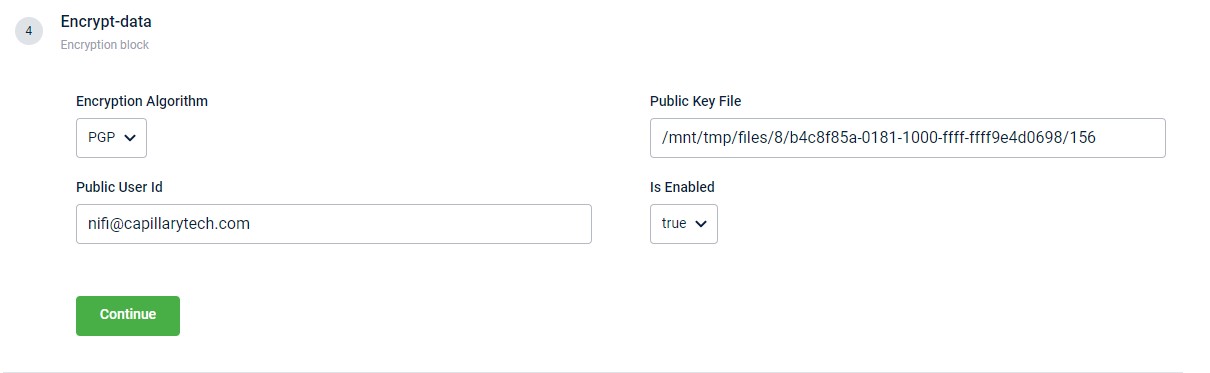
This block enables the encryption of an output file generated using the PGP algorithm. You can use the Is Enabled drop-down to control the activation of this block.
| Field name | Description |
|---|---|
| Encryption Algorithm | The algorithm to encrypt the file. At present, only the PGP algorithm is supported. Hence, by default, PGP encryption is always selected. |
| Public User Id | Public user ID. |
| Public Key File | Public encryption key. |
| Is Enabled | Enable or disable the encrypt function. |
Creating PGP public & private key
PGP is an encryption method based on public-key cryptography. It uses a pair of keys — a public key for encrypting data and a private key for decrypting it. These keys can be created and managed using the GnuPG (GPG) tool, which implements the OpenPGP standard. Perform the following steps to create a PGP key pair using the command line interafce.
- Install the GnuPG in your operating system.
- macOS:
brew install gnupg - Linux:
sudo apt install gnupg - Windows Powershel:
winget install GnuPG.GnuPG
- macOS:
- Use the command
gpg --full-generate-keyand generate a PGP key-pair. - Select the type of key you want to generate.
- Define the length of the keys.
- Specify the duration for which the keys should be valid.
- Enter the name and email ID for creating the User ID.
- Enter Okay.
- Enter a passphrase when prompted.
The system creates a public and private key.
brew install gnupg
bash

gpg --full-generate-key


Please select what kind of key you want:
  (1) RSA and RSA
  (2) DSA and Elgamal
  (3) DSA (sign only)
  (4) RSA (sign only)
  (9) ECC (sign and encrypt) *default*

What keysize do you want? (2048) 1024


Key is valid for? (0) 0
Key does not expire at all
Is this correct? (y/N) y


GnuPG needs to construct a user ID to identify your key.

Real name: <Your Name>
Email address: <[email protected]>
Comment: <optional>


You selected this USER-ID:
  "<Your Name> (<optional comment>) <[email protected]>"
Change (N)ame, (C)omment, (E)mail or (O)kay/(Q)uit? o


We need to generate a lot of random bytes…
(public key generation may take a moment)


public and secret key created and signed.

pub   dsa1024 YYYY-MM-DD [SC]
      <Key Fingerprint>
uid                      <Your Name> (<optional comment>) <[email protected]>
sub   elg1024 YYYY-MM-DD [E]
Updated 3 months ago
Did this page help you?