
Push to S3
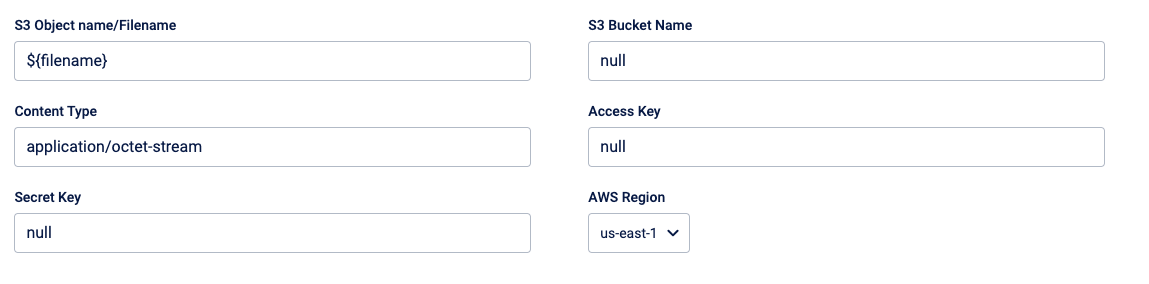
Enter the following details:
-
S3 Object name/Filename - Defines the name that will be given to the file(s) uploaded to S3. Use the default value. You can also use the expression language and define the file name. For the "Audience reload from FTP template", enter the object name in the format
<audience_Group_Name>/${filename}, where audience_Group_Name is the audience name used in the Engage+. -
S3 Bucket Name - Enter the S3 bucket name.
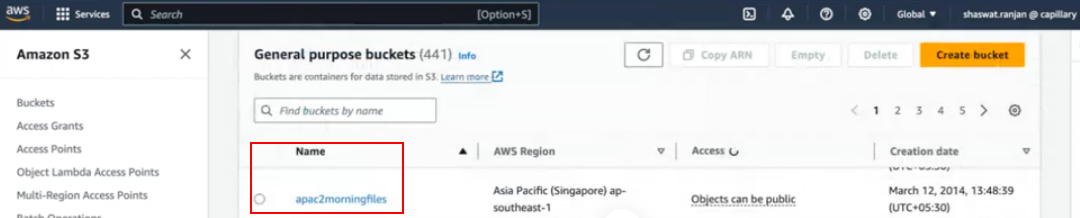
-
Content Type - Use the default value
application/octet-stream. This enables the copying of all file types. -
Access Key & Secret Key - Enter the S3 access key and secret key.
-
AWS region - Enter the AWS region to which you are transferring the files.
- US East 1 - For the bucket in the India region
- EU West 1 - For the bucket in the EU region
- AP Southeast 1 - For the bucket in the Singapore region
- US East 2 - For the bucket in the US regions
Note: If you do not have information on the Access key, secret and AWS region, create a ticket to the Sustenance team.
Note: If you do not have information on the Access key, secret and AWS region, create a ticket to the Access team.
Updated 4 months ago