The following standard permission sets are available and are designed to align with common user roles and responsibilities within the organization. The permissions that do not have a tick mark are the actions that are not available in the permissions.
Category
Permission Set
Description
Member Care
Customer/PII Deletion
Perform customer/PII deletion-related activities in Member Care.
Member Care Authorize
Authorize specific Member Care operations.
MemberCare Create
Create Member Care entities.
MemberCare Activate
Activate Member Care entities.
MemberCare Goodwill Explore
Explore goodwill options within Member Care.
MemberCare Explore
General exploration within Member Care.
Vulcan Permissions
Vulcan Super Admin
Vulcan Admin permissions plus cluster config, app deletion, and Member Care Vulcan override control.
Vulcan Admin
Vulcan Developer permissions plus app creation/editing, build promotion, and build enable/disable.
Vulcan Developer
Vulcan Viewer permissions plus app build uploads and build enable/disable on UAT.
Vulcan Viewer
Read-only access to Vulcan apps on the platform.
Extension Permissions
Extension Org Viewer
Read-only access to extensions.
Extension Org Admin
Manage extension configs and enable/disable extension options for organizations.
Extension Admin
Allow creation and updates of extensions.
Neo Permissions
Neo Admin
Includes Neo Editor permissions plus approve/reject data flows, update names/tags, and publish versions live.
Neo Editor
Includes Neo Viewer permissions plus non-critical POST requests like saving a data flow.
Neo Viewer
View rule listings, rule versions, and the data flow canvas. Supports only GET requests.
Neo Promote
Grants permission to promote approved or live dataflows to mapped target organizations. This permission must be assigned in both the source and target organizations for a promotion to succeed.
Data Management
Data Import
Handle data import processes.
Finance
Finance Manager
Manage finance-related activities.
Insights+
Insights View
View all modules in Insights+. Users can't create, edit, or delete.
Insights Create
View, create, and edit across all Insights+ modules.
Insights Admin
View, create, edit, and delete across all Insights+ modules.
Engage+
Engage+ Authorize
Authorize Engage+ actions.
Engage+ Activate
Activate Engage+ campaigns.
Engage+ Explore
Explore Engage+ functionalities.
Program Management
Program Manager
Oversee program management tasks.
Promotion Manager
Handle promotions within the system.
Loyalty+
Loyalty+ Explore
Explore functionalities within Loyalty+.
Dev Console
Dev Console Brand POC
View access to metrics across different dashboards. Applicable for Brand POCs.
Dev Console External Tech Lead
View/read/approve permissions across all features. Applicable for Tech Leads and higher-level roles.
Dev Console External Developer
View/read access across all features.
Dev Console Admin
Complete permissions to the Dev Console. Applicable for Admin users. Admin user have full permissions, with access restricted to the Dev Tools team.
Request Workflow
Request Workflows - Check Request
Permission set responsible for evaluating, processing, and approving pending requests. Applies to Customer Status Changes and Loyalty Points Redemption.
Request Workflows - Make Request
Permission to create and submit requests for new workflows. This includes Customer Status Changes and Loyalty Points Redemption.
Org Settings
Org Settings - Finance Manager
View access to the following modules: ClientLogFile, Credits Management, Org Finance Code, Credits Management v2, and Gateway Mapping in the organization settings.
Org Settings - Data Manager
Access for the following modules: Miscellaneous, Omni Channel Settings, Organization Setup, Master Data Management, Master Data Management, Tools, Gratification & Engagement, Customer Feedback System, Subscription Settings, Systems & Deployment, Product (Inventory), Communication & Gateway, Capillary Admin, Master Data Management, Organization Setup in organization settings.
External User
External User
Access to set a user as external, preventing access to the Capillary organization. This permission can be set from Capillary Org only.
Customer/PII DeletionThis permission set suits those who approve/view/reject customer/PII deletion-related activities in Member Care.
Module
Sub-Module
Create
Approval
View
Member Care
Customer PII
✔
✔
✔
Vulcan
Vulcan Super Admin
The Vulcan Super Admin access group is designed for users who require the highest level of administrative privileges within the Vulcan system. Users with Super Admin access can delete applications, set up, modify, and delete cluster CF configurations, and override Member Care UI.
Module
Sub-Module
Create
View
Edit
Delete
Insights+
Reports
✔
Segments
✔
Export
✔
Settings
✔
OTHER_PERMISSIONS
Application Listing Page
✔
App ID Creation
✔
Prefix Validation
✔
i18n Config Validation
✔
Application Creation
✔
Application Details
✔
Edit Application
✔
Get Deployments by App ID
✔
Create Deployment by App ID
✔
Enable Deployment in UAT
✔
Enable Deployment in Prod
✔
Get Deployment Details
✔
Update Deployment
✔
Update Cluster Config
✔
Delete Cluster Config
✔
Delete Application
✔
Upsert OAuth Clients
✔
Vulcan Admin
This access level is for administrators managing the overall application. Users with Admin access can create new applications, enable or disable User Acceptance Testing (UAT) mode, enable or disable production (PROD) mode, and delete applications.
Module
Sub-Module
Create
Edit
View
Delete
Insights+
Reports
✔
Segments
✔
Export
✔
Settings
✔
Other
View application listing page
✔
Create app_id for applications
✔
Validate prefix
✔
Validate i18n config
✔
Create application
✔
Get application details by appId
✔
Edit application
✔
Get deployments by appId
✔
Create deployment by appId
✔
Enable deployment in UAT
✔
Enable deployment in Prod
✔
Get deployment details by ID
✔
Update deployment
✔
Update cluster config
✔
Delete cluster config
✔
Delete application
✔
Upsert OAuth clients on Vulcan
✔
Vulcan Developer
This access level is for developers actively working on application development and testing. Users with this access can upload new builds to the platform and enable or disable User Acceptance Testing (UAT) mode.
Module
Sub-Module
Create
View
Edit
Delete
Insights+
Reports
✔
Segments
✔
Export
✔
Settings
✔
Other
Access to view application listing page
✔
Access to get application details by appId
✔
Access to get deployments by appId
✔
Access to create deployment by appId
✔
Access to enable deployment in UAT environment
✔
Access to get deployment details by deploymentId
✔
This access level is for users to view the application without making any changes.
Module
Sub-Module
View
Insights+
Reports
✔
Segments
✔
Export
✔
Settings
✔
Other
Access to view application listing page
✔
Access to get application details by appId
✔
Access to get deployments by appId
✔
Access to get deployment details by deploymentId
✔
Extension
Extension Org Viewer
This access group applies to an individual who wants to view the extensions available for the org.
Module
Sub-Module
View
Edit
Create
Delete
Member Care
Customer profile
✔
✔
✔
✔
Customer goodwill
✔
Customer group
✔
Other
Access to delete customer cache
✔
Access for edit sessions
✔
Access for create sessions
✔
Access for sessions record create
✔
Access for sessions end create
✔
Extension Org Admin
This access group applies to an individual who manages extension configs and enable/disable extension options for orgs.
Module
Sub-Module
View
Edit
Create
Delete
Member Care
Customer
✔
✔
✔
✔
Customer profile
✔
✔
✔
✔
Customer goodwill
✔
Customer group
✔
Other
Settings view and update permission
✔
✔
Access to delete customer cache
✔
Access for edit sessions
✔
Access for create sessions
✔
Access for sessions record create
✔
Access for sessions end create
✔
Extension Admin
This access group is applicable for users who create and update extensions.
Module
Sub-Module
View
Edit
Create
Delete
Member Care
Customer profile
✔
✔
✔
✔
Customer goodwill
✔
Customer group
✔
Other
Access to delete customer cache
✔
Access for edit sessions
✔
Access for create sessions
✔
Access for sessions record create
✔
Access for sessions end create
✔
Neo
Neo Admin
This access group is applicable for users who approve/reject data flows, update names/tags, and publish data flow versions.
Module
Sub-Module
View
Create
Other
OTHER_PERMISSIONS
Ext Neo rule list view
✔
Ext Neo rule ver list view
✔
Ext Neo rule action
✔
Ext Neo get rule ver
✔
Ext Neo get rule details
✔
Ext Neo get rule meta blocks
✔
Ext Neo add rule meta block
✔
Ext Neo edit rule meta block
✔
Ext Neo create rule
✔
Ext Neo save rule
✔
Ext Neo send for app
✔
Ext Neo edit rule
✔
Ext Neo approve rule
✔
Ext Neo restore rule
✔
Ext Neo reject rule
✔
Ext Neo rule codeview
✔
Ext Neo rule tags
✔
Neo Editor
This access group is applicable for users who perform certain non-critical actions on Neo such as saving a data flow.
Module
Sub-Module
View
Create
Other
OTHER_PERMISSIONS
Ext Neo rule list view
✔
Ext Neo rule ver list view
✔
Ext Neo get rule ver
✔
Ext Neo get rule details
✔
Ext Neo get rule meta blocks
✔
Ext Neo add rule meta block
✔
Ext Neo edit rule meta block
✔
Ext Neo create rule
✔
Ext Neo save rule
✔
Ext Neo send for app
✔
Ext Neo edit rule
✔
Ext Neo restore rule
✔
Ext Neo rule codeview
✔
Ext Neo rule tags
✔
Neo Viewer
This access group is applicable for users who want to view Neo configuration/workflow.
Module
Sub-Module
View
Create
Other
Neo
Ext Neo rule list view
✔
Ext Neo rule ver list view
✔
Ext Neo get rule ver
✔
Ext Neo get rule details
✔
Ext Neo get rule meta blocks
✔
Ext Neo rule codeview
✔
Ext Neo rule tags
✔
Neo Promote
This access group grants permission to promote approved or live dataflows from one organization to another within the same cluster. The permission must be assigned in both the source and target organizations for a promotion to succeed.
Without this permission set, the Promote option is not accessible. Users who attempt to promote without this permission receive an access denied error.
Module
Sub-Module
View
Edit
Create
Other
Neo
Ext Neo promote rule
✔
Ext Neo org mappings rule
✔
Data Import
This permission set is suitable for the Data Import team.
Module
Sub Module
View
Approval
Engage+
CampaignWorkflow
✔
Insights+
Reports
✔
Segments
✔
Export
✔
Settings
✔
Finance Manager
This permission set is suitable for the Finance team.
Module
Sub Module
View
Create
Approval
Member Care
Customer Retro Transaction
✔
✔
Engage+
CampaignWorkflow
✔
✔
Incentive
✔
Audience
✔
Report
✔
Crative
✔
Insights+
Reports
✔
✔
MemberCare
MemberCare Authorise
This permission set is suitable for the users who approve or reject requests on MemberCare.
Module
Sub-Module
Approval
Member Care
Customer PII
✔
Customer Retro Transaction
✔
Requests
Requests Goodwill Points
✔
Requests Goodwill Coupons
✔
Requests ID Change
✔
Requests Transaction
✔
Group
Group Goodwill
✔
MemberCare Create
This permission set is suitable for users who perform create and edit actions on MemberCare. For example, creation of a request.
Module
Sub-Module
View
Create
Edit
Approval
Member Care
Customer
✔
Customer Profile
✔
✔
Customer PII
✔
✔
Customer Retro Transaction
✔
✔
Customer Cards
✔
✔
Requests
✔
Requests Goodwill Points
✔
✔
Requests Goodwill Coupons
✔
✔
Requests ID Change
✔
✔
Requests Transaction
✔
✔
Group
✔
Group Goodwill
✔
✔
Insights+
Reports
✔
✔
MemberCare Activate
This permission allows users to view Goodwill requests and edit customer profiles.
Module
Sub-Module
View
Create
Edit
Member Care
Customer Profile
✔
✔
Requests
Requests Goodwill Coupons
✔
MemberCare Goodwill Explore
This permission allows users to view Goodwill requests, including the Group goodwill requests.
Module
Sub-Module
View
Member Care
Requests Goodwill Points
✔
Requests Goodwill Coupons
✔
Group Goodwill
✔
MemberCare Explore
This permission allows users to view customer details on MemberCare except for the requests.
Name
Module
View
Create
Edit
Delete
Member Care
Customer profile
✔
✔
✔
✔
Customer PII
✔
Customer Retro Transaction
✔
Requests
Requests ID Change
✔
Requests ID Reallocation/Merge
✔
Requests Transaction
✔
Insights+
Reports
✔
Insights+
📘
Note
RBAC doesn't apply to KPIs and dimensions. All users with Insights+ access can view, create, edit, and delete KPIs and dimensions regardless of their assigned permission set.
Insights View
Grants read-only access to all Insights+ modules.
Module
Sub-module
View
Insights+
Reports
✔
Segments
✔
Exports
✔
Chart Library
✔
External Facts
✔
Settings
✔
Insights Create
Grants view, create, and edit access across all Insights+ modules.
Module
Sub-module
View
Create
Edit
Insights+
Reports
✔
✔
✔
Segments
✔
✔
✔
Exports
✔
✔
✔
Chart Library
✔
✔
✔
External Facts
✔
✔
✔
Settings
✔
✔
✔
Insights Admin
Grants view, create, edit, and delete access across all Insights+ modules.
Module
Sub-module
View
Create
Edit
Delete
Insights+
Reports
✔
✔
✔
Segments
✔
✔
✔
Exports
✔
✔
✔
✔
Chart Library
✔
✔
✔
✔
External Facts
✔
✔
✔
Settings
✔
✔
✔
Engage+
Engage+ Authorize
This permission allows users to create and approve a campaign on Engage+. The user will be also able to create and approve Incentives and messages.
Module
Sub-Module
View
Create
Edit
Approval
Engage+
CampaignWorkflow
✔
✔
✔
✔
Messages
✔
✔
Incentive
✔
✔
✔
Audience
✔
Report
✔
Creatives
✔
Config
✔
Insights+
Reports
✔
Engage+ Activate
This permission set has permissions required to create and approve a workflow on Engage+. In addition, the user can also configure messages and incentives.
Module
Sub-Module
View
Create
Edit
Approval
Engage+
CampaignWorkflow
✔
✔
✔
✔
Messages
✔
Incentive
✔
✔
Audience
✔
Report
✔
Creatives
✔
Config
✔
Insights+
Reports
✔
Engage+ Explore
This permission set allows the user to view various Engage+ workflows.
Module
Sub-Module
View
Approval
Engage+
CampaignWorkflow
✔
✔
Incentive
✔
Audience
✔
Report
✔
Creatives
✔
Insights+
Reports
✔
Program Manager
This permission set enables a user to create a loyalty program.
Module
Sub-Module
View
Create
Loyalty+
Program
✔
✔
Promotion Manager
This permission set enables a user to create a loyalty promotion.
Module
Sub-Module
View
Create
Loyalty+
Promotion
✔
✔
Loyalty+ Explore
This permission set enables users to view the Loyalty+ modules.
Module
Sub-Module
View
Loyalty+
Basic
✔
Dev Console
Dev Console External Tech Lead
Module
Sub-Module
View
Create
Approval
(Default)
List ext neo configurations
✔
Request to add new config
✔
Approve new config addition request
✔
Execute read queries.
✔
Raise hotswap request
✔
Approve hotswap request
✔
View db audit logs
✔
View deployment build history
✔
Create new build
✔
View metrics
✔
View Application Logs
✔
Dev Console External Developer
Module
Sub-Module
View
Create
Approval
(Default)
List ext neo configuration
✔
Request to add new config
✔
Execute read queries on Neo and Extension DBs
✔
Raise hotswap request
✔
Raise write query request
✔
View Package Manager
✔
View db audit logs
✔
View deployment build history
✔
View metrics
✔
View Application Logs
✔
Dev Console Admin
Module
Sub-Module
View
Create
Approval
(Default)
List ext neo configurations
✔
Request to add new config
✔
Approve new config addition request
✔
Approve write queries
✔
Execute read queries.
✔
Raise hotswap request
✔
Approve hotswap request
✔
View db audit logs
✔
View deployment build history
✔
Create new build classic extensions
✔
View metrics
✔
View Application Logs
✔
External User
Module
Sub Module
View
Insights
Reports
✔
Segments
✔
Export
✔
Settings
✔
Org Settings - Data Manager
Module
Sub Module
View
Loyalty+
Basic Access
✔
Insights
Reports
✔
Loyalty+
Loyalty+ Promotions
These permission sets relate to roles based on loyalty promotions.
Loyalty+ Promotions Admin
Sub Modules
View
Create
Edit
Delete
Approval
Basic Operations
✔
✔
✔
Listing Page
✔
Status Change
✔
✔
Duplicate
✔
Stop
✔
Loyalty+ Promotions Approver
Sub Modules
View
Create
Edit
Delete
Approval
Status Change
✔
Loyalty+ Promotions Editor
Sub Modules
View
Create
Edit
Delete
Approval
Basic Operations
✔
✔
Status Change
✔
Duplicate
✔
Loyalty+ Promotions Viewer
Sub Modules
View
Create
Edit
Delete
Approval
Basic Operations
✔
Listing Page
✔
Data Import
The following standard permission sets are available for Data Import:
Data Importer
Sub Modules
View
Create
Edit
Delete
Approval
Access to the listing page in the Import
✔
Access to creating the job in the Import
✔
Data Import Administrator
Sub Modules
View
Create
Edit
Delete
Approval
Access to All Import API
✔
Access to the listing page in the Import
✔
Access to creating the job in the Import
✔
Access to approving or rejecting a job in the Import
✔
Sensitive data access
The Sensitive data access permission controls whether a user can view PSI data in the Member Care UI. You grant or remove this permission by using the toggle switch.
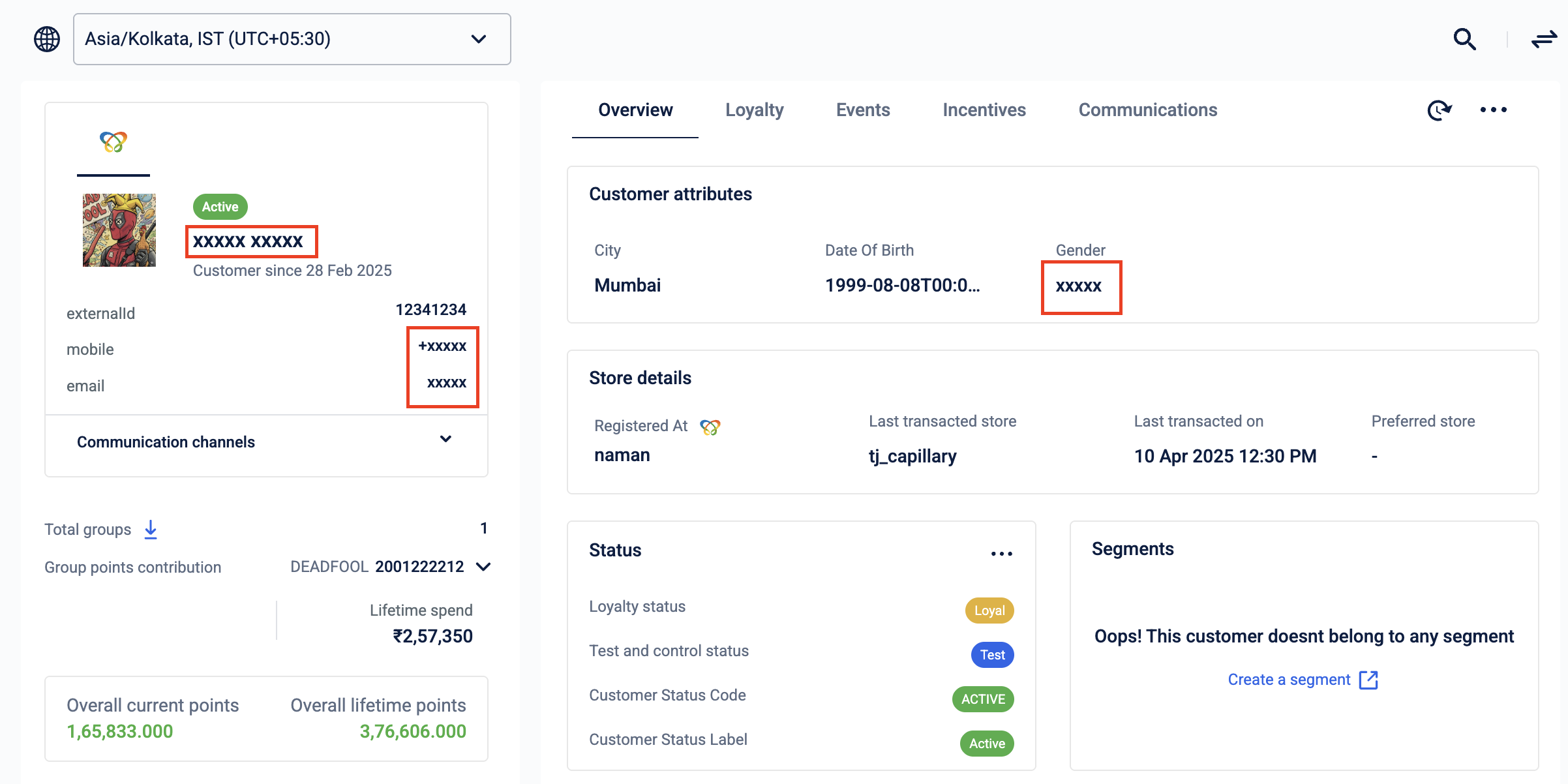
If a user does not have this permission set, PSI values are masked and displayed as XXXXX.
Masked PII and PSI data
Incentives and Rewards
The following permission sets are available for the Incentives and Rewards modules:
📘
Note
Currently, the Admin role has the same permissions as the Editor role. Approve and Reject permissions will be added to the Admin role in a future release, after which the two roles will differ.
Rewards+
Rewards Admin
Module
View
Create
Edit
Delete
Approval
Rewards
✔
✔
✔
Rewards Editor
Module
View
Create
Edit
Delete
Approval
Rewards
✔
✔
✔
Rewards Viewer
Module
View
Create
Edit
Delete
Approval
Rewards
✔
Badges
Badges Admin
Module
View
Create
Edit
Delete
Approval
Badges
✔
✔
✔
Badges Editor
Module
View
Create
Edit
Delete
Approval
Badges
✔
✔
✔
Badges Viewer
Module
View
Create
Edit
Delete
Approval
Badges
✔
Coupons
Coupons Admin
Module
View
Create
Edit
Delete
Approval
Coupons
✔
✔
✔
Coupons Editor
Module
View
Create
Edit
Delete
Approval
Coupons
✔
✔
✔
Coupons Viewer
Module
View
Create
Edit
Delete
Approval
Coupons
✔
Coupon Linking
Coupon Linking controls whether users working in other modules, such as Campaigns, Journeys, Loyalty, or the Rewards catalog, can claim coupons from those modules.
Coupon Linking does not grant access to the Coupons module itself. Users assigned only Coupon Linking can claim coupons from other modules, but cannot view or manage anything within the Coupons module.
Coupons Node API
The Coupons Node API is a required backend access permission that must be assigned with every standard Coupons role (Viewer, Editor, or Admin). Without this permission, users with a Coupons role cannot perform basic tasks, even if the role appears to be assigned correctly. This permission is required for backward compatibility and is not included in the standard Coupons roles.
Cart Promotions
Cart Promotions Admin
Module
View
Create
Edit
Delete
Approval
Cart Promotions
✔
✔
✔
Cart Promotions Editor
Module
View
Create
Edit
Delete
Approval
Cart Promotions
✔
✔
✔
Cart Promotions Viewer
Module
View
Create
Edit
Delete
Approval
Cart Promotions
✔
Gift Vouchers
Gift Vouchers Admin
Module
View
Create
Edit
Delete
Approval
Gift Vouchers
✔
✔
✔
Gift Vouchers Editor
Module
View
Create
Edit
Delete
Approval
Gift Vouchers
✔
✔
✔
Gift Vouchers Viewer
Module
View
Create
Edit
Delete
Approval
Gift Vouchers
✔
Future development
The following permission sets are created for future development:
API Access Configuration Viewer
API Access Configuration Admin
Connect+ Viewer
Connect+ Editor
Note: Incentives Admin will be deprecated in a future release. Users currently assigned this role will be migrated automatically.