
October-November-December 2025
Platform
OTP Rate Limiting for New Organizations
We have implemented rate limiting for the OTP validation API for all new organizations created after 15th October 2025. Existing organizations are encouraged to enable this configuration for improved security.
Documentation: https://docs.capillarytech.com/reference/validate-otp#/
Enhanced Event Notification UI
The Event Notification UI now provides visibility into event payloads and delivery statuses. Users can view events and access webhook-level logs, improving troubleshooting and integration processes. This enhancement streamlines event notification management and reduces reliance on external tools for testing.
Documentation: https://docs.capillarytech.com/docs/manage-webhook#/
https://docs.capillarytech.com/docs/view-event-feed#/
Correction of SKIP_DOWNSTREAM Parameter
The SKIP_DOWNSTREAM parameter has been updated to skipDownstream. With this change, you can add or update v2 customer and transaction records through the API without notifying downstream systems like EMF. It is especially helpful during data migration or small fixes, where you want to upload or correct data without triggering any loyalty actions. This makes data updates easier and removes the need for extra imports.
Documentation: https://docs.capillarytech.com/reference/v2-add-customer#/
https://docs.capillarytech.com/reference/add-customer#/
https://docs.capillarytech.com/reference/update-customer-detail#/
https://docs.capillarytech.com/reference/add-transaction-single#/
https://docs.capillarytech.com/reference/addreturn-transaction-bulk#/
https://docs.capillarytech.com/reference/update-transaction#/
https://docs.capillarytech.com/reference/update-transaction-bulk#/
Bulk User Deletion Added to Self Serve User Management
Users can now delete multiple accounts simultaneously within the Self Serve User Management interface. This enhancement streamlines administrative tasks, saving time and reducing manual effort. The feature improves efficiency for organizations managing large user bases, ensuring smoother user management workflows and greater control over account maintenance.
Documentation: https://docs.capillarytech.com/docs/onboarding-user#deleting-users-in-bulk
Engage
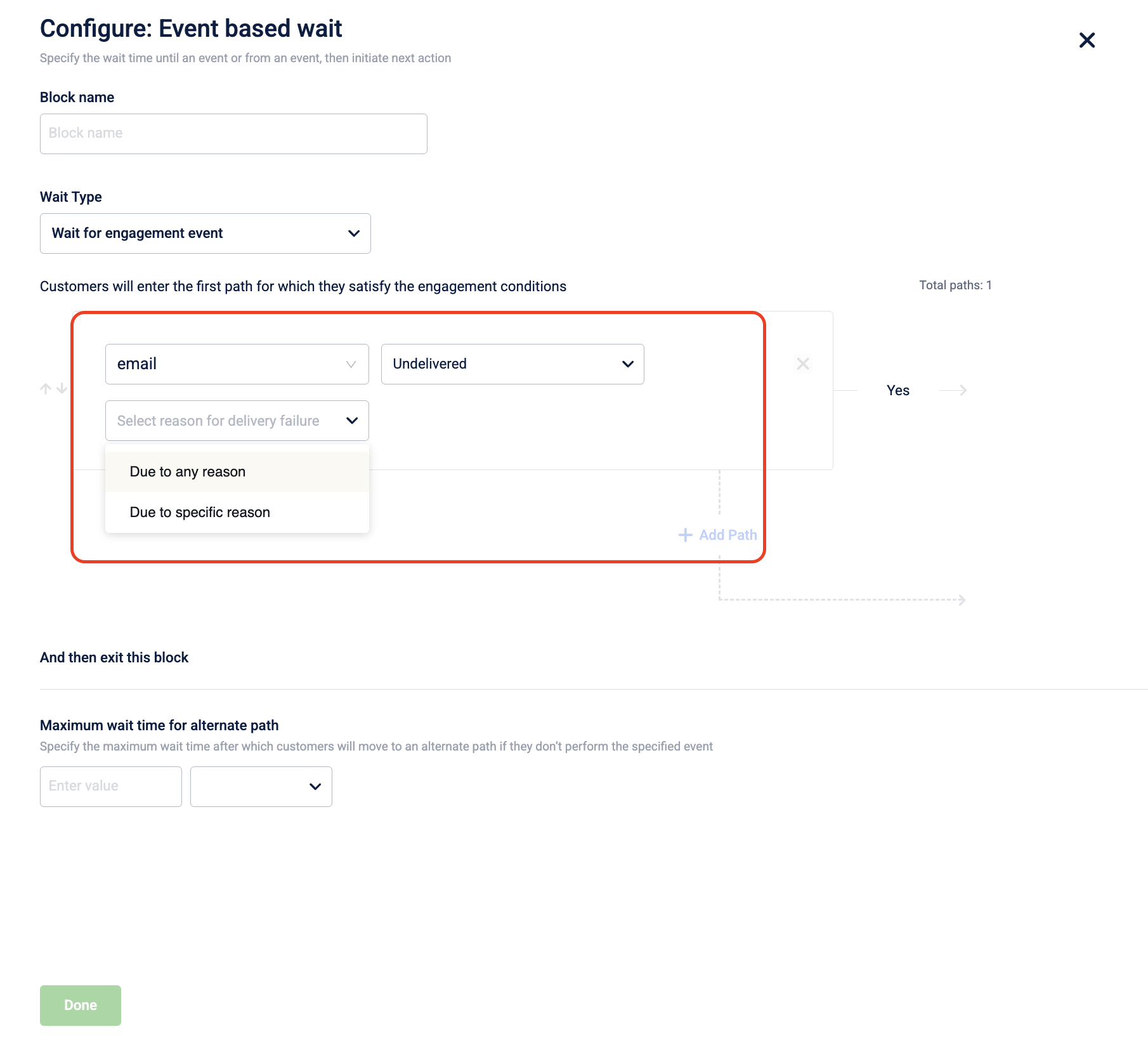
Support for Undelivered Communication Events in Journeys
We have introduced support for undelivered communication events in journey flows, allowing marketers to create fallback paths for users whose messages failed to deliver. This enhancement enables more effective engagement strategies by targeting users based on their delivery status, improving overall communication effectiveness.
Documentation: https://docs.capillarytech.com/docs/overview-journey#engagement-event-conditions
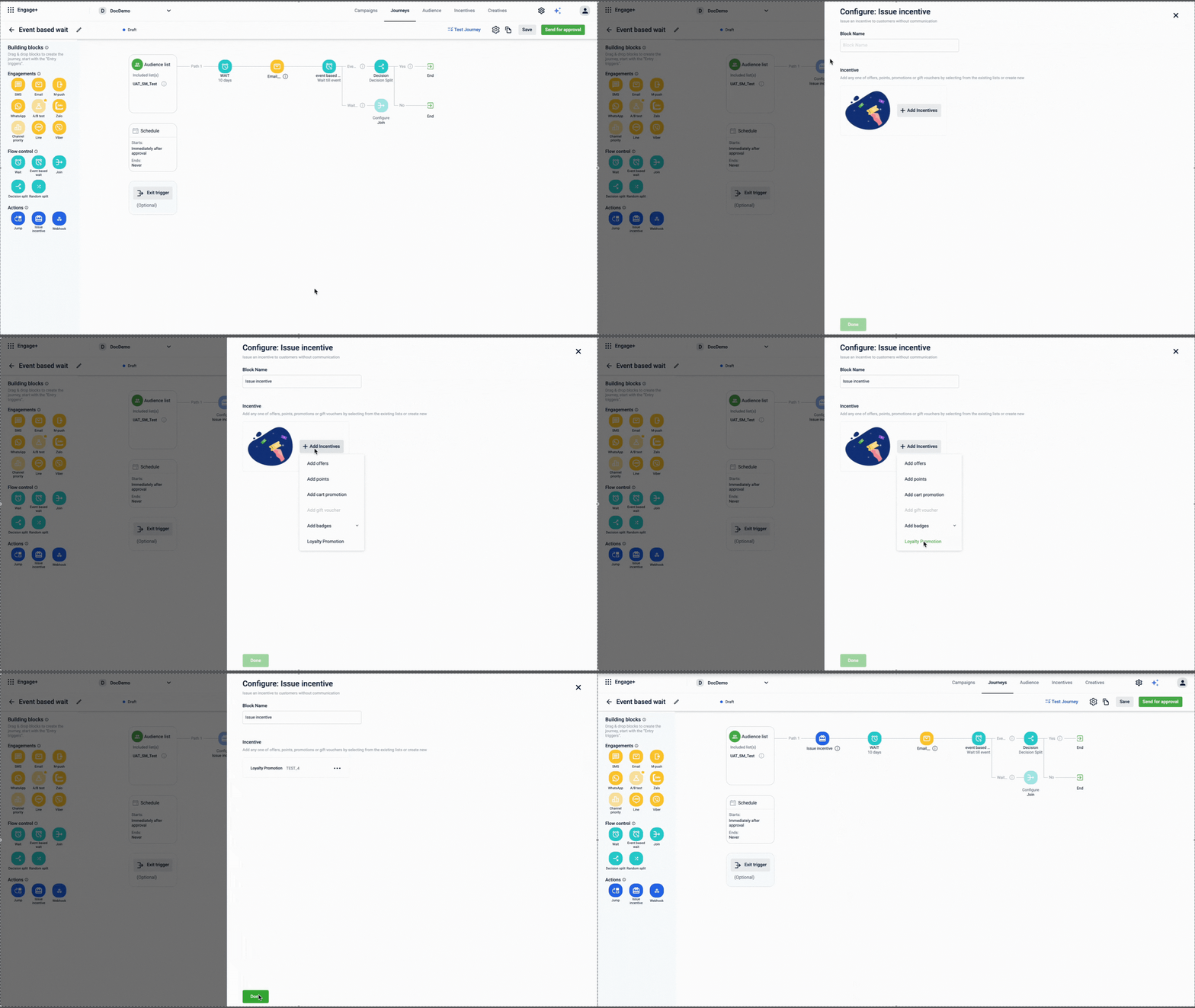
Launch of Issue Loyalty Promotions Block for Journeys
The new Issue Loyalty Promotions block allows Journey builders to seamlessly enrol customers in loyalty promotions and issue benefits directly within workflows. This integration enhances automation and personalization, reducing manual intervention and improving customer experience.
Documentation: https://docs.capillarytech.com/docs/action-building-block#/issue-incentive
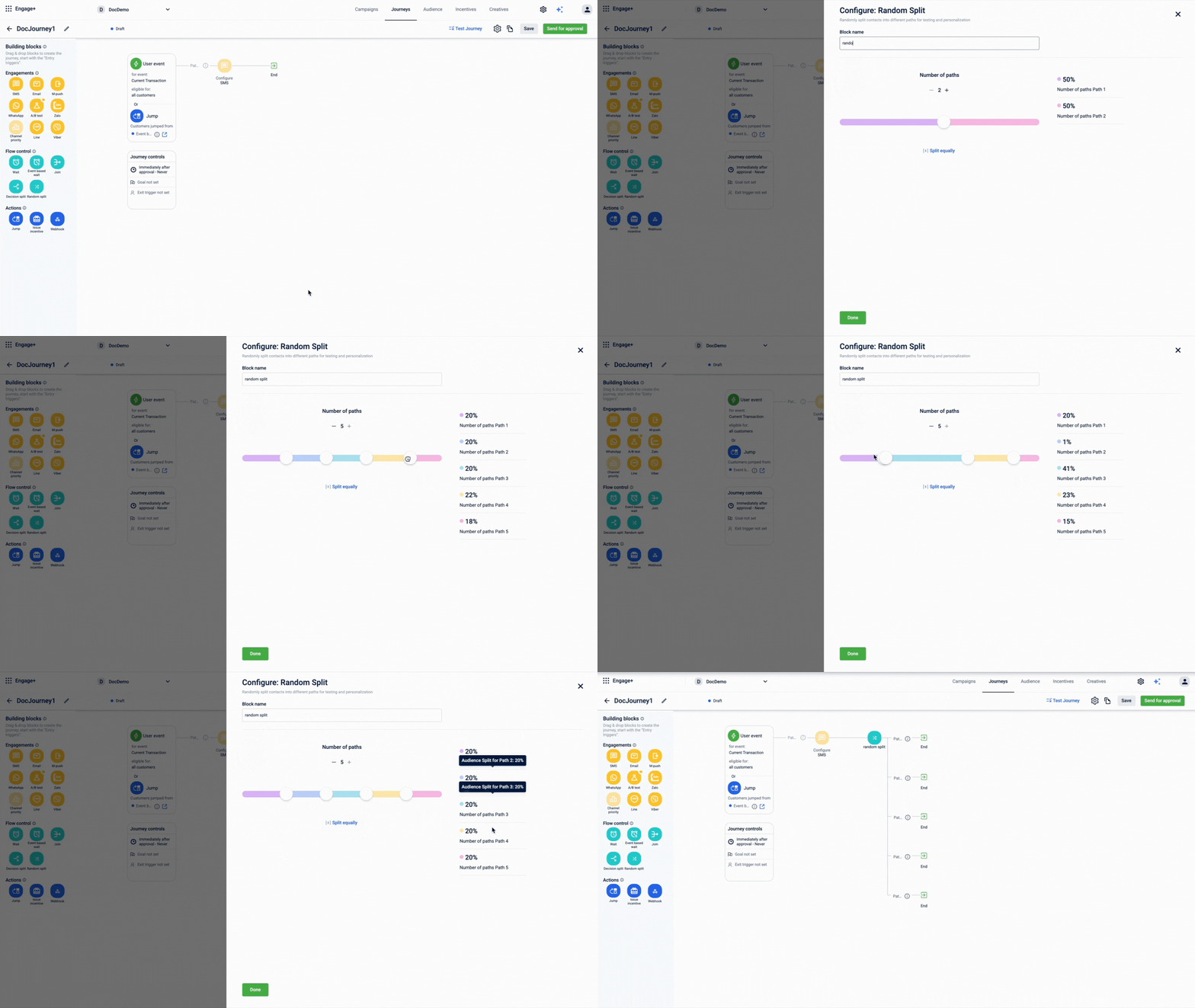
Introducing Random Split Activity in Journey Builder
Marketers can now utilize the Random Split activity to divide contacts for A/B testing and personalization. This feature enhances campaign effectiveness by allowing flexible distribution percentages, ensuring optimized customer journeys through data-driven insights.
Documentation: https://docs.capillarytech.com/docs/flow-control-building-block#/random-split-block
Incentives
Enhanced Pagination and Query Parameters for Coupons API
The Coupons API now features pagination and advanced query parameters to streamline data retrieval. You can retrieve coupon series more efficiently by managing result sets using offset and limit, and filtering results precisely by coupon status. Refer to documentation
Enhanced Cart Promotions for Points Payment
The cart promotions now support new tender mode conditions and product combo conditions, allowing marketers to create promotions based on payment modes and specific product combinations. This enhancement enables more flexible promotional strategies, improving customer engagement and satisfaction. Eg. "Buy Coke & ChocoBrand biscuit with Points payment mode, and get 50% off on Maggi noodles."
Refer to documentation
Add SeriesCode Support in Get coupon series API
The Get coupon series API now supports fetching offer details using seriesCode filter, in addition to seriesId. This enhancement simplifies third-party integrations by allowing direct access to offer details, eliminating the need to loop through lists. Refer to documentation
Neo Extension
Code review
The new Code review feature in Neo introduces a structured review and approval process for dataflows. Neo Admins can now review changes through a dedicated Review Changes modal, which provides a clear view of updates across four tabs: Summary, Comments, Description, and Code Diff. The feature supports both AI-generated and admin review comments. Users can also resolve AI comments automatically through Fix with AI.
Refer to documentation
Applications
The Applications feature in Neo introduces a structured way to organize dataflows by grouping them into logical containers based on their purpose or business function. Neo now supports three application types—Default, Middleware, and Custom—each with specific behaviors for how dataflows are classified and managed. Users with Neo Edit permission can create up to 20 custom applications, move dataflows between custom applications, and rename them. Middleware dataflows are system-managed and automatically classified based on pre-matching or post-matching tags. This feature improves visibility, reduces clutter, and makes it easier to locate and maintain dataflows as organizations scale.
Refer to documentation: https://docs.capillarytech.com/docs/using-applications#/
Dev console
App Request Logs and Neo Log Insights
The App Request Logs page in the Dev Console enables you to view all transactions sent by an application to New Relic within a selected time range. This feature allows you to trace requests, filter logs using New Relic and custom headers, and quickly identify specific requests or failures.
For Neo applications, a new Neo Log Insights view is now available. Selecting a Request ID opens detailed execution insights, including raw logs, block execution flow, errors, block I/O, DAO-based inspection, and request metadata. These enhancements improve debugging efficiency and provide deeper visibility into application and dataflow behavior.
Documentation: https://docs.capillarytech.com/docs/view-app-request-logs#/
Updated about 21 hours ago