
October-November-December 2025
Platform
OTP Rate Limiting for New Organizations
We have implemented rate limiting for the OTP validation API for all new organizations created after 15th October 2025. Existing organizations are encouraged to enable this configuration for improved security.
Documentation: https://docs.capillarytech.com/reference/validate-otp#/
Enhanced Event Notification UI
The Event Notification UI now provides visibility into event payloads and delivery statuses. Users can view events and access webhook-level logs, improving troubleshooting and integration processes. This enhancement streamlines event notification management and reduces reliance on external tools for testing.
Documentation: https://docs.capillarytech.com/docs/manage-webhook#/
https://docs.capillarytech.com/docs/view-event-feed#/
Correction of SKIP_DOWNSTREAM Parameter
The SKIP_DOWNSTREAM parameter has been updated to skipDownstream. With this change, you can add or update v2 customer and transaction records through the API without notifying downstream systems like EMF. It is especially helpful during data migration or small fixes, where you want to upload or correct data without triggering any loyalty actions. This makes data updates easier and removes the need for extra imports.
Documentation: https://docs.capillarytech.com/reference/v2-add-customer#/
https://docs.capillarytech.com/reference/add-customer#/
https://docs.capillarytech.com/reference/update-customer-detail#/
https://docs.capillarytech.com/reference/add-transaction-single#/
https://docs.capillarytech.com/reference/addreturn-transaction-bulk#/
https://docs.capillarytech.com/reference/update-transaction#/
https://docs.capillarytech.com/reference/update-transaction-bulk#/
Bulk User Deletion Added to Self Serve User Management
Users can now delete multiple accounts simultaneously within the Self Serve User Management interface. This enhancement streamlines administrative tasks, saving time and reducing manual effort. The feature improves efficiency for organizations managing large user bases, ensuring smoother user management workflows and greater control over account maintenance.
Documentation: https://docs.capillarytech.com/docs/onboarding-user#deleting-users-in-bulk
PSI Data Masking in MemberCare & API Responses
PSI masking is now supported in API responses & MemberCare, configurable at the organization and client level. Sensitive data is automatically masked for unauthorized API clients, enhancing privacy and compliance. This update helps limit exposure of confidential information and meets security requirements without impacting authorized access.
Documentation: https://docs.capillarytech.com/docs/masking-psi-fields
Configurable Validation for Extended Fields in Customer Add API
The V2 Customer Add & Update API now allows configurable validation for empty or null values in extended fields. Administrators can enable strict validation to ensure data quality or permit empty values for flexible integrations and migrations. Contact support to change the validation setting as needed for your business workflows.
Documentation: https://docs.capillarytech.com/reference/v2-add-customer#extended-field-empty-and-null-value-validation
Bulk User Update via CSV Upload Validation Enhancements
Bulk user update now includes enhanced CSV validation and error reporting. The system validates each entry, provides clear feedback on errors, and allows you to update only valid users. This streamlines user management and reduces manual effort for large-scale updates.
Documentation: https://docs.capillarytech.com/docs/onboarding-user#updating-users-in-bulk
Bulk User Add Validation Enhancements
Bulk user addition now includes enhanced CSV validation and error reporting. Invalid entries are flagged with clear messages, and an error file can be downloaded for review. The Create button is disabled if no valid users are present, ensuring only correct data is processed for user onboarding.
Documentation: https://docs.capillarytech.com/docs/onboarding-user#adding-bulk-users
Expanded Query Support for v2 Customer Transactions API
The v2 Customer Transactions API now supports additional query parameters for transactionId, startId, endId, number, and enhanced embed options. These changes ensure feature parity with v1.1, making client migration smoother and maintaining backward compatibility while leveraging v2 improvements.
Documentation: https://docs.capillarytech.com/reference/v2api-get-customer-transactions
Enhanced Customer Details API: Bridging v1 and v2 Gap
The GET /v2/customers/{id} API now supports additional query parameters to fetch NDNC status, opt-in status, slab history, and tier criteria. This enables seamless migration from v1.1, allowing clients to retrieve extended customer data on demand without impacting existing integrations or performance.
Documentation: https://docs.capillarytech.com/reference/get-customer-details-v2
Enhanced Coupon Series Details in v2 API
The v2/coupon/is_redeemable and v2/coupon endpoints now return comprehensive coupon series details, matching the information previously available in v1.1. Additionally, a new validTillISODate field has been added in v2/coupon for date-only expiry representation. These improvements ensure greater transparency and consistency for clients integrating coupon validation and redemption workflows.
Documentation: https://docs.capillarytech.com/reference/check-if-coupon-is-redeemable
https://docs.capillarytech.com/reference/get-coupon-details
Enhanced Product Entity Search APIs
Product entity APIs now support partial (starts-with) search and hierarchical queries for SKUs, brands, categories, and attributes. CRUD operations and OU-level scoping are enabled, with paginated, alphabetically sorted results. This enhancement streamlines product lookup and management for Loyalty+ and Engage+ UIs, improving efficiency for large catalogs and organizational units.
Documentation: https://docs.capillarytech.com/docs/product
Engage
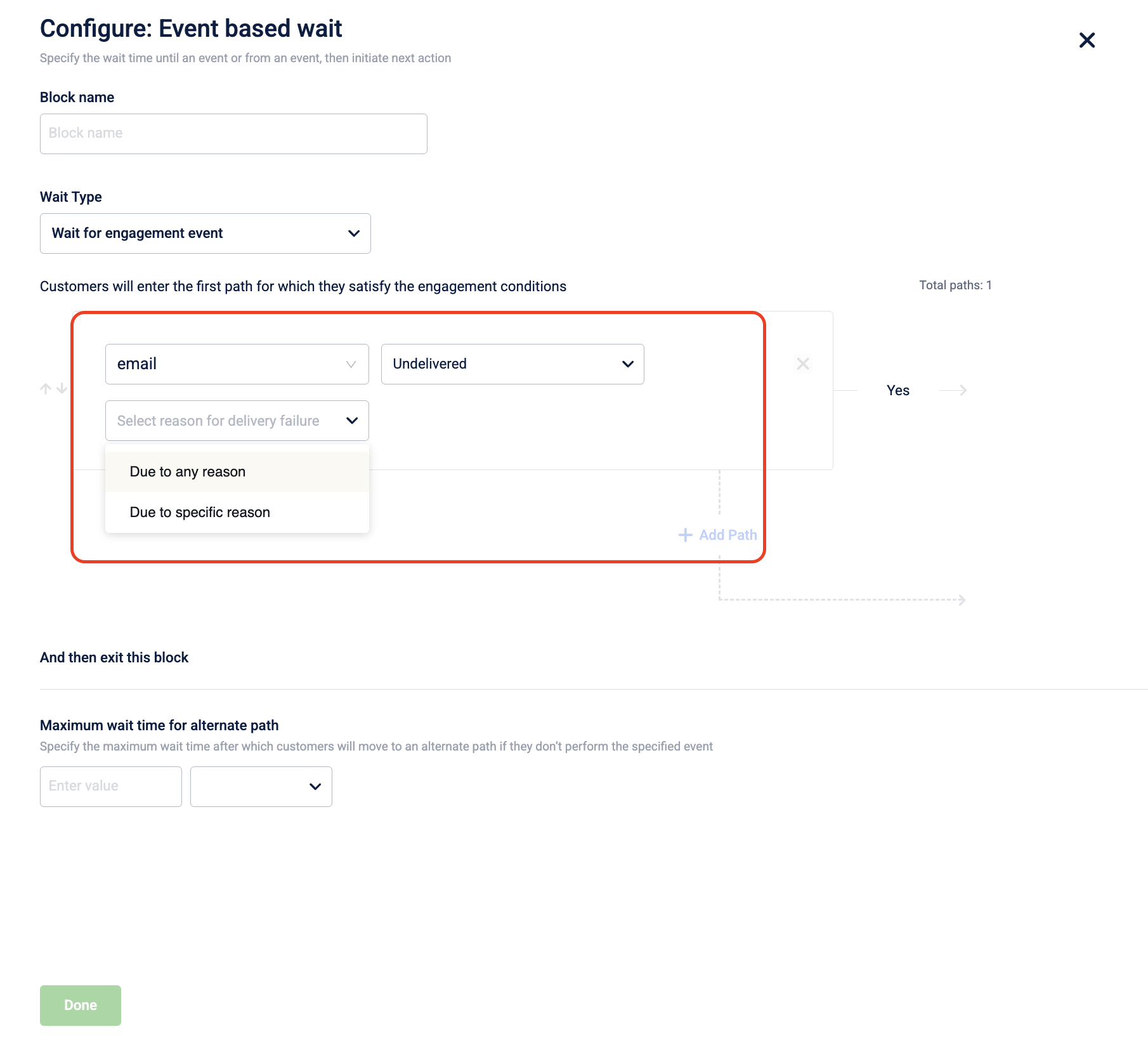
Support for Undelivered Communication Events in Journeys
We have introduced support for undelivered communication events in journey flows, allowing marketers to create fallback paths for users whose messages failed to deliver. This enhancement enables more effective engagement strategies by targeting users based on their delivery status, improving overall communication effectiveness.
Documentation: https://docs.capillarytech.com/docs/overview-journey#engagement-event-conditions
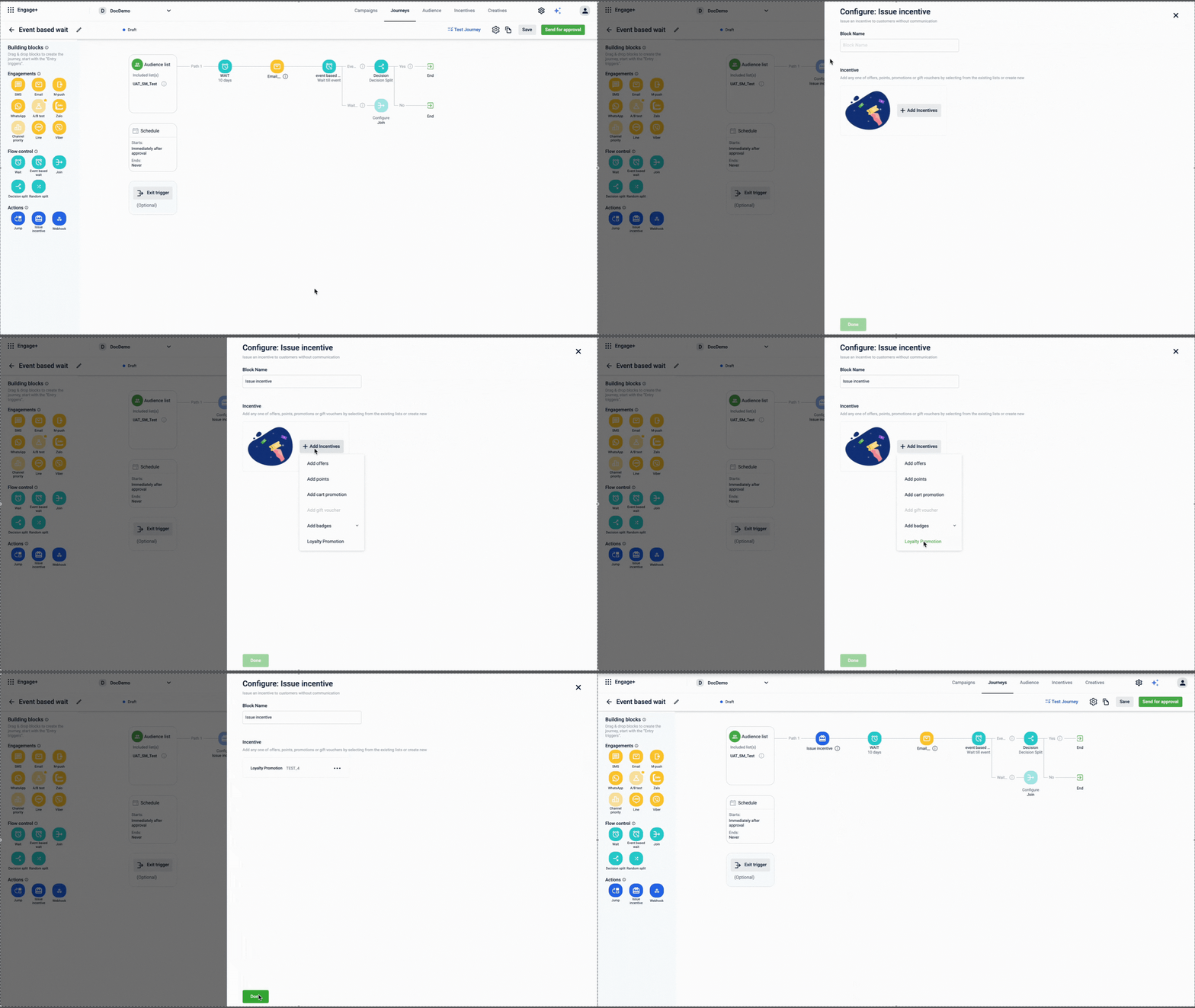
Launch of Issue Loyalty Promotions Block for Journeys
The new Issue Loyalty Promotions block allows Journey builders to seamlessly enrol customers in loyalty promotions and issue benefits directly within workflows. This integration enhances automation and personalization, reducing manual intervention and improving customer experience.
Documentation: https://docs.capillarytech.com/docs/action-building-block#/issue-incentive
Journey Attribution and Conversion Tracking Feature Released
The new Journey Attribution feature allows brands to define conversion goals for their journeys, enhancing performance tracking and optimization. This capability enables better analysis of customer interactions and improves decision-making for marketing strategies, ultimately driving higher ROI.
Documentation:https://docs.capillarytech.com/docs/configure-journey#configuring-the-conversion-goal-optional
Enhanced Date Field Comparisons in Journeys
We have introduced the ability to compare date fields within entry triggers in journeys. This enhancement allows users to set conditions based on transaction dates relative to customer registration dates, improving journey customization and decision-making capabilities.
Documentation:https://docs.capillarytech.com/docs/configure-events-and-conditions#event-profiles-and-attribute
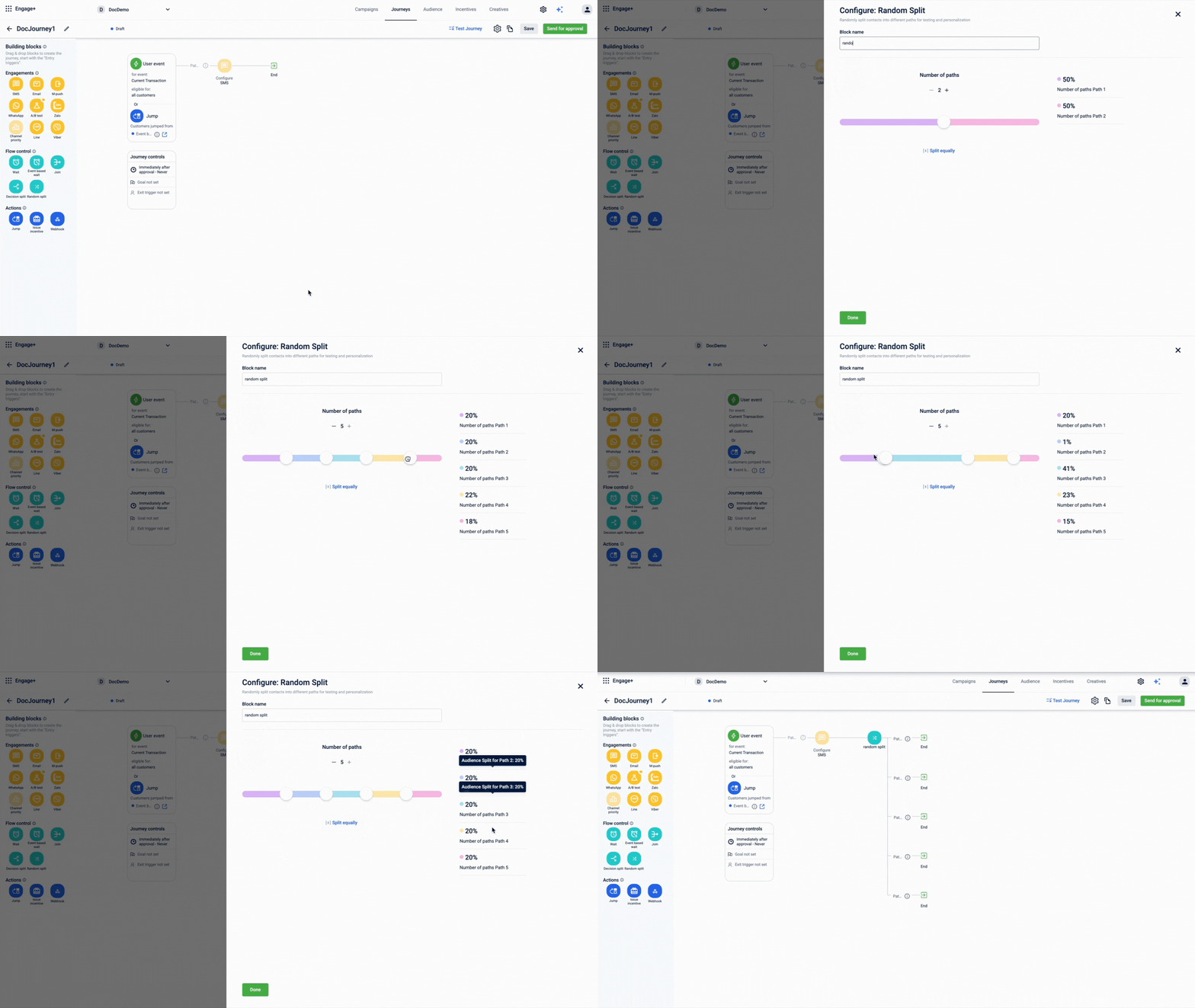
Introducing Random Split Activity in Journey Builder
Marketers can now utilize the Random Split activity to divide contacts for A/B testing and personalization. This feature enhances campaign effectiveness by allowing flexible distribution percentages, ensuring optimized customer journeys through data-driven insights.
Documentation: https://docs.capillarytech.com/docs/flow-control-building-block#/random-split-block
Personalization now available in Webhook Blocks
Introducing personalization tags in the webhook block, enabling journey builders to dynamically access event attributes within the webhook block. This provides flexibility for external system integrations, improving journey personalization and automation using entry events.
Documentation: https://docs.capillarytech.com/docs/supported-labels-for-engagement-channels#/
Expanded Personalization Tags in Journeys and Campaigns
New tags for Registered Concepts and Gap to Upgrade are now available in both Journeys and Campaigns, enabling more precise and personalized customer communication. Additionally, event date tags have been introduced for Journeys. These enhancements bring consistency of tags across campaigns and journeys.
Documentation: https://docs.capillarytech.com/docs/supported-labels-for-engagement-channels#/
Documentation: https://docs.capillarytech.com/docs/configure-events-and-conditions#event-profiles-and-attribute
Incentives
Enhanced Pagination and Query Parameters for Coupons API
The Coupons API now features pagination and advanced query parameters to streamline data retrieval. You can retrieve coupon series more efficiently by managing result sets using offset and limit, and filtering results precisely by coupon status.
Refer to the documentation
Enhanced Cart Promotions for Points Payment
The cart promotions now support new tender mode conditions and product combo conditions, allowing marketers to create promotions based on payment modes and specific product combinations. This enhancement enables more flexible promotional strategies, improving customer engagement and satisfaction. Eg. "Buy Coke & ChocoBrand biscuit with Points payment mode, and get 50% off on Maggi noodles."
Refer to the documentation
Add SeriesCode Support in Get coupon series API
The Get coupon series API now supports fetching offer details using seriesCode filter, in addition to seriesId. This enhancement simplifies third-party integrations by allowing direct access to offer details, eliminating the need to loop through lists.
Refer to the documentation
Edit Restrictions on Expired Rewards
The reward catalog now allows updating restriction settings for expired rewards without duplication. This allows for easy error correction and future reuse by marketers, while ensuring the status remains expired.
Refer to the documentation
Support for Coupon Code Prefixes and Suffixes
Coupons now allow you to add custom prefixes and suffixes to your coupon codes. You can set these for your whole organization or for specific coupon series. This makes it easier to organize and recognize your codes.
Refer to the documentation
Hydra SDK - React Native
Version 1.4.0
- Added
isHydraInitializedfunction to check if the hydra initialization is completed - Usage of HydraConfig.plist and hydra_config.json is deprecated
- Use only one Github token, using .env for Github credentials is deprecated, reading these credentials from system environment.
- Notification icons, placeholder icons and notification color should be added to the react native codebase. Adding to android resources and Images.xcassets is deprecated.
- Fixed Linker issue with iOS when we were using ios frameworks in dynamic linking
Refer to the documentation for details.
Hydra SDK - iOS
Version 1.7.3
- Added
customerIdto all logs for improved traceability. - Introduced an info log when a notification is received by the extension.
- Enhanced real-time debugging: when
remoteDebugLevelis enabled, INFO logs now bypass batching and are sent immediately for faster visibility into critical events. - Added detailed info logs for all HTTP API calls, including request details.
- Included all DLR events (received, shown, clicked, dismissed, rejected, ignored) in INFO logs for better monitoring and analytics.
- Fixed issue of unread notification count is not increasing in built-in- Notification center when app is in foreground
Refer to the documentation for details.
Loyalty
Better pagination for the Get customer redemption API
The Get points redemption API now supports limit and offset for easier pagination. This update improves efficiency and flexibility when retrieving customer redemption records.
Refer to the documentation
Idempotency Support for Manual Currency Allocation API
The manual point allocation API now supports a uniqueId parameter for idempotency. This enhancement prevents duplicate point or currency allocations during network retries or partial failures, ensuring customers receive rewards only once per request. The update improves reliability and safeguards against accidental duplicate processing in bulk or repeated API calls.
Documentation: https://docs.capillarytech.com/reference/issue-reward-currency#/
Central Communication System Integration for Loyalty Actions
Loyalty+ now uses the Central Communication System (CCS) for key workflow actions, including Renew Tier, Allocate Points, Upgrade to Tier, and Issue Coupon. This enables seamless, centralized messaging across channels like WhatsApp and LINE, improving reliability and scalability for loyalty program communications.
Documentation: https://docs.capillarytech.com/docs/actions
Neo Extension
Code review
The new Code review feature in Neo introduces a structured review and approval process for dataflows. Neo Admins can now review changes through a dedicated Review Changes modal, which provides a clear view of updates across four tabs: Summary, Comments, Description, and Code Diff. The feature supports both AI-generated and admin review comments. Users can also resolve AI comments automatically through Fix with AI.
Refer to documentation
Applications
The Applications feature in Neo introduces a structured way to organize dataflows by grouping them into logical containers based on their purpose or business function. Neo now supports three application types—Default, Middleware, and Custom—each with specific behaviors for how dataflows are classified and managed. Users with Neo Edit permission can create up to 20 custom applications, move dataflows between custom applications, and rename them. Middleware dataflows are system-managed and automatically classified based on pre-matching or post-matching tags. This feature improves visibility, reduces clutter, and makes it easier to locate and maintain dataflows as organizations scale.
Refer to documentation: https://docs.capillarytech.com/docs/using-applications#/
Dev console
App Request Logs and Neo Log Insights
The App Request Logs page in the Dev Console enables you to view all transactions sent by an application to New Relic within a selected time range. This feature allows you to trace requests, filter logs using New Relic and custom headers, and quickly identify specific requests or failures.
For Neo applications, a new Neo Log Insights view is now available. Selecting a Request ID opens detailed execution insights, including raw logs, block execution flow, errors, block I/O, DAO-based inspection, and request metadata. These enhancements improve debugging efficiency and provide deeper visibility into application and dataflow behavior.
Documentation: https://docs.capillarytech.com/docs/view-app-request-logs#/
Insights
Role-Based Access Control for Insights+
Insights+ now supports robust role-based access control (RBAC), allowing administrators to grant or restrict user access at the product level. This enhancement ensures only authorized users can view or interact with Insights+, improving security and compliance.
Documentation: https://docs.capillarytech.com/docs/insights-plus-overview#who-can-access-insights
Updated 5 months ago