
Issue Reward
The issue reward action lets you issue specific rewards to customers.
Use Case
Prerequisites
- Create a loyalty program
- Configure the reward to issue
Requirement:
A retail brand wants to reward customers with a predefined reward when they make a purchase. The brand wants to issue rewards as a fixed quantity based on the customers’ tier and also notify the customer.
Solution
- In the Loyalty workflow, trigger the action on the required qualifying event.
- Add the Issue Reward action.
- Select the required reward from the Reward dropdown.
- Choose the recipient entity Members from the Issue to dropdown.
- Select the Number of rewards to be issued as Fixed amount
- Toggle Same for all tiers to OFF to issue different quantities of rewards for customers across different tiers and provide the number of rewards to issue for each tier.
- Enable Communication to notify customers through supported channels.
- Save the action to complete the configuration.
Configuring the Issue Reward action
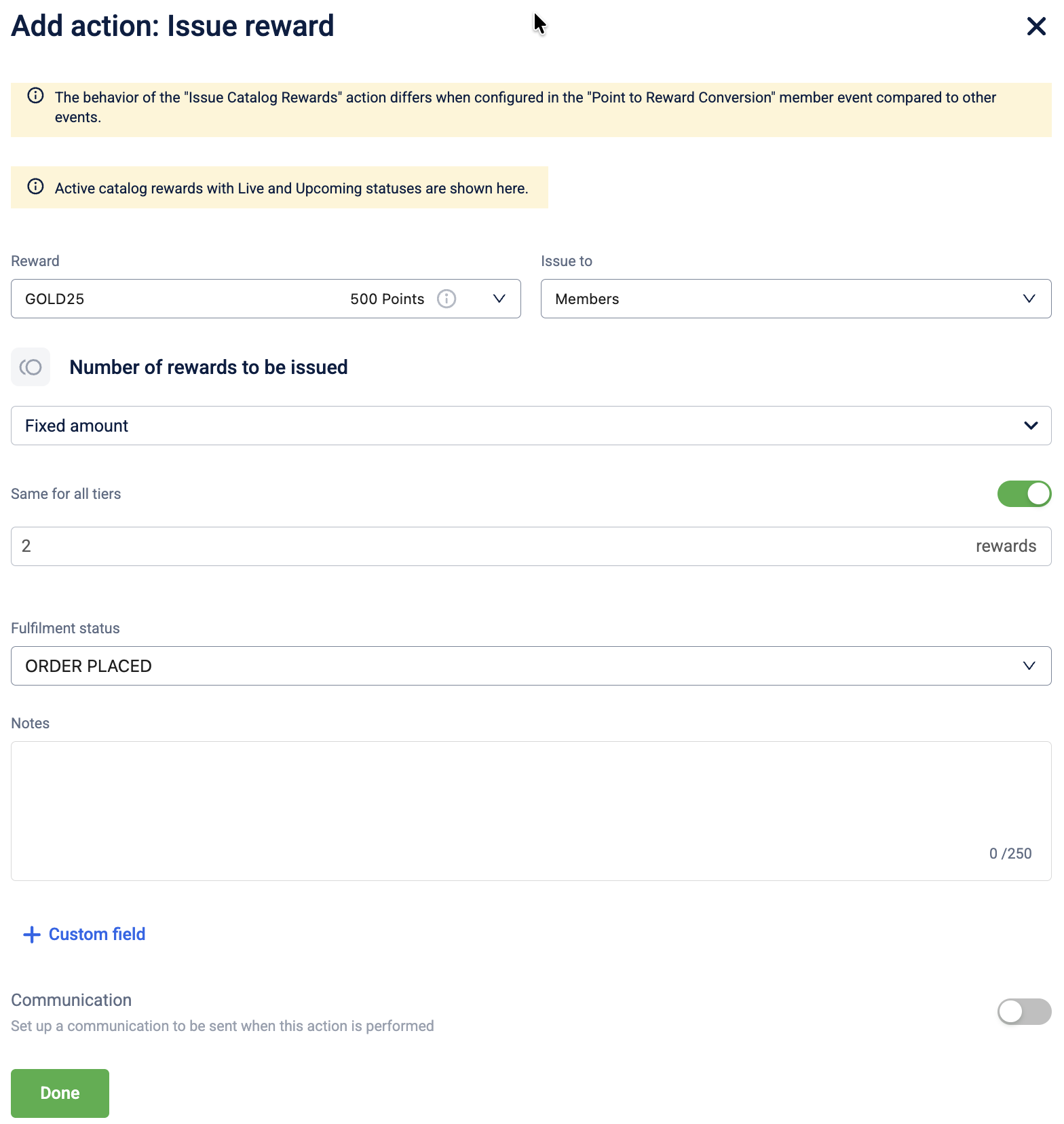
To configure the Issue Reward action, follow these steps:
-
Select Issue Reward from the action list.
-
In the Reward dropdown, select the specific reward to issue.
-
In the Issue to dropdown, select the recipient entity. The following options are available:
| Entity | Description |
|---|---|
| Members | Issues the badge to the individual customer, triggering the event. |
| Member groups | Issues the badge to a specific target group. |
| Referee | Issues the badge to the person being referred (used in referral workflows). |
| Referrer | Issues the badge to the person making the referral (used in referral workflows). |
- In the Number of rewards to be issued dropdown, select the issual criterion. The following issue criteria are available:
| Coupon issue criteria | Description | Example |
|---|---|---|
| Fixed amount | A specific quantity of coupons is issued for a qualifying event, regardless of the transaction value. | |
| Multiplier | Applies a multiplication factor to the base quantity of coupons defined in the earn rule. | |
| Dynamic | The quantity of coupons is calculated as a percentage of a specific base value | |
| Stepped | Issues a specific quantity of coupons for every defined interval of spend (step size). |
-
Toggle Same for all tiers to ON to issue a fixed quantity of rewards for customers across all tiers. Toggle Same for all tiers to OFF to issue different quantities of rewards for customers across different tiers. If you create a new tier for the loyalty program, you must also reconfigure the values for the promotion.
-
Enter the quantity of coupons to issue.
-
Toggle Communication to ON to notify the customer when the reward is issued, and select the communication channels.
-
Select Save to complete the configuration.
Updated 1 day ago