
Loyalty Promotion Limits
To manage a promotion's budget and ensure its effectiveness, you can apply participation and reward limits. These are crucial controls that set the boundaries for member involvement (participation) and the benefits they can receive (rewards). They help prevent over-expenditure, create a sense of exclusivity for limited-time offers, and provide precise control over the loyalty promotion's lifecycle.
Enrolment limits
Enrolment limits control a member's participation lifecycle within a promotion. They define the rules for how and when members can be part of the promotion, including how long their enrolment lasts, how many times they can re-enrol, and the total number of participants allowed. This helps you manage exclusivity and control the duration of a member’s active involvement.
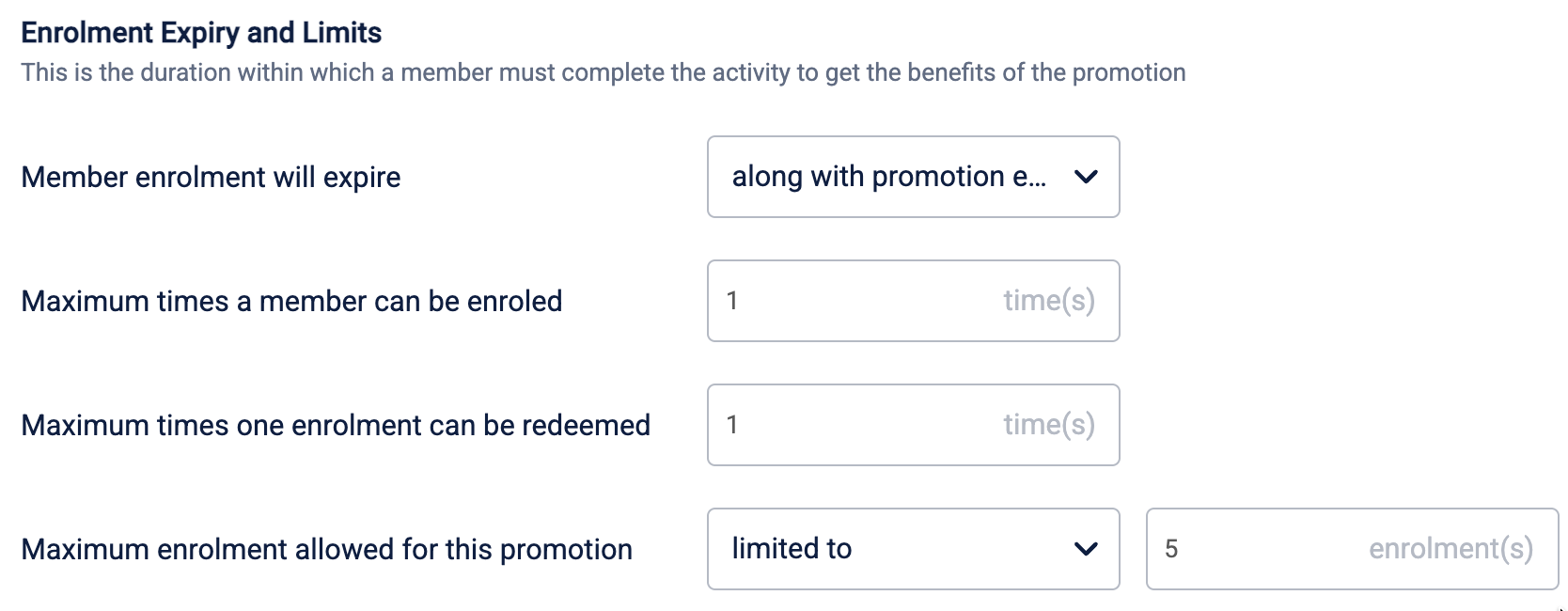
The following table elaborates on the available enrolment limits
| Limit | Description |
|---|---|
| Member enrolment will expire | Defines how long a member's enrolment remains active after they have successfully enrolled. Once expired, the member is no longer a part of the promotion and will not receive any benefits unless they are eligible to re-enrol. You can set the expiry to occur on a specific date, after a set number of days, or along with the promotion's end date. |
| Maximum times a member can be enrolled | Defines the total number of times an individual member can enrol in the loyalty promotion over the entire lifecycle. After exhausting the limit, a member can no longer enrol, even if their previous enrolment expires. For example, setting this to '1' ensures a member can participate only once. |
| Maximum times one enrolment can be redeemed | Defines how many times a member can complete the earning activity and receive benefits during a single enrolment period. For example, if a promotion offers bonus points for purchases, setting this to '3' means an enrolled member can earn those bonus points on three separate purchases before their enrolment expires. |
| Maximum enrolment allowed for this promotion | Sets a global cap on the total number of enrolments for the entire promotion across all members. This is ideal for exclusive promotions, such as limiting an exclusive offer to the first 1,000 members who enrol. By default, there is no limit. |
NoteEnrolment limits are available only when the enrolment criteria is Specific members
Opt-in limits
Opt-in limits apply specifically to promotions that require members to perform an action to signal their interest before they can earn the benefits. These settings control the validity of the initial opt-in, defining how long their opt-in status remains active and how many times they are allowed to opt into the promotion. This is essential for managing promotions that require explicit member consent to participate.

The following table elaborates on the opt-in limits that are available:
| Limit | Description |
|---|---|
| Member opt-in will expire | Defines how long a member’s opt-in status remains active after they have successfully opted in. Once expired, they must opt in again (if permitted) to become eligible for enrolment. You can set the expiry to occur on a specific date, after a set number of days, or to align with the promotion's end date. |
| Maximum times a member can opt-in | Defines the total number of times an individual member can opt into the promotion over their entire lifecycle. For example, setting this to '1' ensures a member can opt in and participate only once. |
Loyalty promotion limits
While enrolment and opt-in limits manage participation, loyalty promotion limits control the rewards themselves. These are the overall caps on the benefits a member can earn from the promotion. They allow you to set boundaries on the total number of times a qualifying activity can be rewarded or the total sum of points or currency that can be issued. This is your primary tool for managing the promotion's budget and preventing reward abuse.
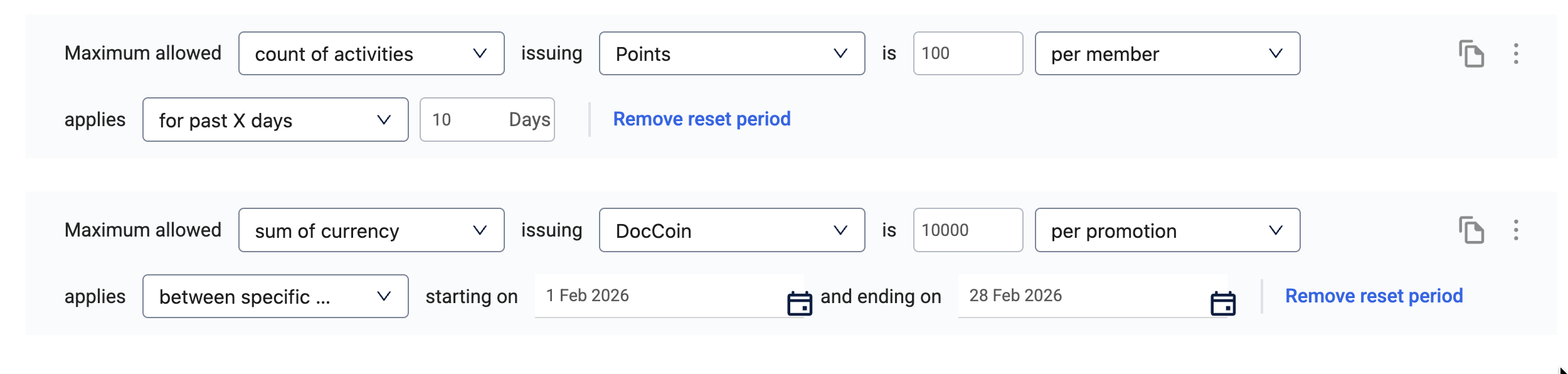
The following table elaborates on the promotion limits that are available:
| Limit type | Description | Example |
|---|---|---|
| Count of activity | Define a limit on the number of activities that can be performed per member, per event, or per promotion. | A member can complete a maximum of three milestones throughout the entire loyalty promotion duration to earn the benefits. Once they reach the limit, they cannot earn more benefits as part of the loyalty promotion. |
| Sum of currency | Define a limit on the total amount of points or alternate currencies that can be issued per member, per event, or per promotion. | A member can earn a maximum of 100 points through the loyalty promotion, throughout the entire loyalty promotion duration. Once they reach the limit, they cannot earn more points as part of the loyalty promotion. |
| Badge | Define a limit on the total number of badges that can be issued per member, per event, or per promotion. | A member can earn a maximum of three badges through the loyalty promotion, throughout the entire loyalty promotion duration. Once they reach the limit, they cannot earn more badges as part of the loyalty promotion. |
Loyalty promotion limits reset period
You can also define a reset period for the promotion limit. This allows the limit to refresh automatically after a specified time, such as daily or weekly, rather than applying just once for the entire promotion.
The following table elaborates on the available reset periods:
| Reset Period | Description | Example |
|---|---|---|
| For past X days | Resets the limit based on a rolling window of the last 'X' days relative to the current activity. | A member can earn a maximum of 500 points in the past 30 days. Once the 30-day window from their first earn passes, they can earn again. |
| Between specific days | The limit applies only within a custom, fixed date range that you define. | A member can only redeem 1 badge between December 25th and December 31st. Outside of these dates, the limit does not apply. |
| Every X days | Resets the limit at regular intervals of 'X' days, starting from the promotion's launch. | A member is limited to 3 qualifying transactions every 7 days. After the 7-day cycle resets, they can qualify for another 3 transactions. |
| Every week | Resets the limit at the start of each new week. The default week is Monday. | A member can earn a maximum of 1000 points every calendar week. The counter resets to zero at the start of the next week. |
| Every calendar month | Resets the limit on the first day of each new month. | A member can receive a maximum of 2 badges every calendar month. On the 1st of the next month, they become eligible for 2 more badges. |
Updated 1 day ago