
Introduction
What is a loyalty promotion?
Loyalty promotions are special, time-bound programs designed to reward members with additional incentives, such as extra points or coupons beyond the standard benefits of a loyalty program. These are special promotions that run for a short period of time along with your regular loyalty program.
Beyond simple rewards, loyalty promotions support advanced structures to drive sustained participation:
- Milestones: Reward members for reaching cumulative targets over time, such as spending a total of $500 within a month or completing 10 transactions in 60 days.
- Streaks: Incentivize consistent, consecutive behavior by rewarding members who maintain a continuous series of actions, running five kilometers every day for a week, or purchasing a coffee every day for a month.
These promotions can be tailored to specific customer activities, such as:
- Making a transaction during a holiday period.
- Adding a product to a wishlist on the mobile application.
- Purchasing a featured or limited-time product.
- Making multiple purchases in a month and reaching a purchase goal.
Examples
Fan engagement promotion:
“NASCAR Fantasy” is a loyalty promotion offered by NASCAR, designed to encourage fan engagement with its fantasy racing platform. The primary goal of this promotion is to increase participation in the NASCAR Fantasy Live game.
- The promotion runs during a race week.
- To earn a reward, members must join the NASCAR Fantasy Live game and select a team of drivers they predict will score the most points in that week’s race.
- Members earn 100 points once they submit their list of top drivers.
Streak-based promotion:
"Morning Coffee Run" is a milestone-based promotion run by a coffee chain, like Starbucks, during spring break to encourage daily habits.
- The promotion runs during the spring break (March - April).
- To earn a reward, members must purchase a coffee between 7 AM and 10 AM for five separate days within a single week.
- Members earn 100 points once they achieve the streak.
Key features
-
Versatile promotion types: Design loyalty promotions for various member activities, such as making a purchase or adding a product to their wishlist.
-
Create milestones to reward cumulative targets, such as spending $500 a month.
-
Create streaks to incentivize consecutive actions, such as logging in for 3 weeks in a row.
-
Define qualifying conditions using dropdown-based rule writing.
-
Diverse reward options: Incentivize members with a wide range of benefits, such as bonus points, limited-time tier upgrades, exclusive badges, or coupons.
-
Role-based access control (maker-checker Workflow): Ensure quality and security with a role-based approval process that separates promotion creation from activation.
-
Zero-downtime live editing: Update active promotions seamlessly, creating a new draft version while the current one continues to run without interruption.
-
Comprehensive lifecycle management: Maintain full control over every stage of your
promotion, from the initial draft to live activation, temporary pausing, and final sunset. -
Liability split: Clearly divide and track who pays for each reward between you and your partners, so everyone knows exactly how much cost they are responsible for in a coalition or partnership promotion.
-
Custom attribute tagging: Enhance internal reporting and analytics by attaching custom metadata such as budget, campaign objectives, and target segment to search, filter, and analyze performance in reports.
What is the difference between a loyalty program and a loyalty promotion?
Loyalty programs and loyalty promotions both reward members, but they serve different strategic purposes. A loyalty program is the foundational, ongoing, long-term strategy by any brand for rewarding members, whereas a loyalty promotion is a short-term strategy run by brands that offers additional incentives or benefits to members.
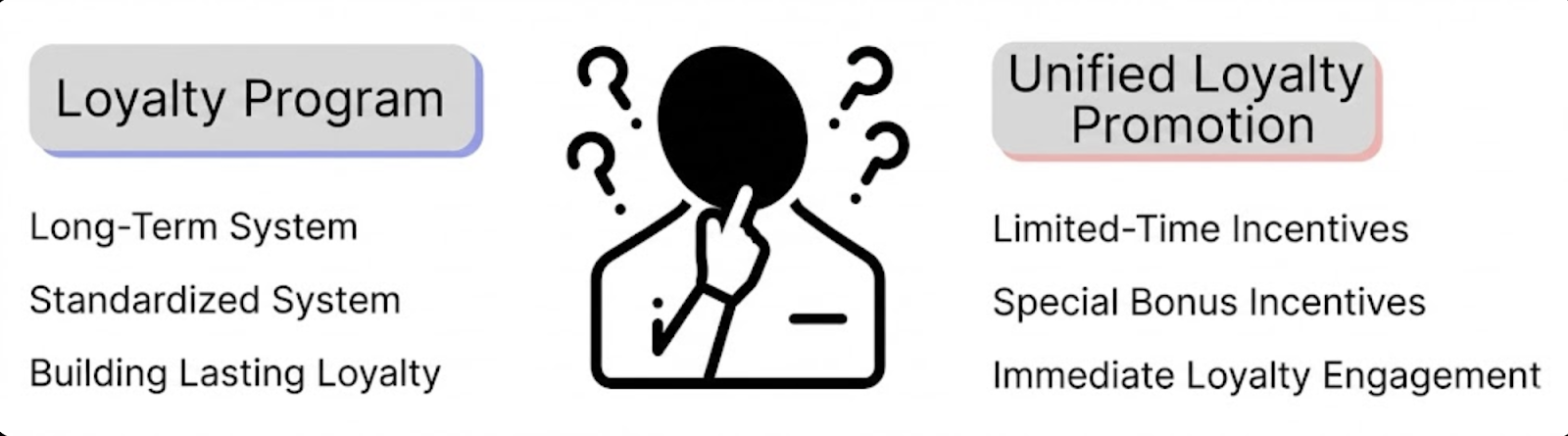
The table below elaborates on the key differences between an ongoing rewards system and targeted special offers:
| Feature | Loyalty Program | Loyalty Promotion |
|---|---|---|
| Duration | Long-term system | Temporary incentives |
| Reward Type | Standard incentives | Extra incentives |
| Main Goal | Lasting loyalty | Immediate engagement |
Lifecycle of a loyalty promotion
Every loyalty promotion you create moves through a lifecycle, represented by a status. This status tells you exactly where the promotion is in its journey, from the initial draft to a live promotion, and finally to its retirement. Understanding each status is essential for managing your loyalty promotion effectively, knowing what actions are possible at each stage.
A loyalty promotion can be in one of the following statuses:
| Status | Description |
|---|---|
| Draft | Represents the initial state of a new promotion. You can edit it while it's inactive. Members can't see promotions in this state, and the system doesn't evaluate them. The primary actions are to edit the draft or send it for approval. |
| Awaiting approval | Represents a promotion submitted for review and pending action from a checker. It cannot be edited by the checker, which makes sure the reviewer sees a consistent version. A maker can revoke the submission to return it to the draft state for further changes. |
| Upcoming | Represents an approved promotion that hasn’t reached its scheduled start date. The configuration is locked, and the promotion isn’t being evaluated for member activities. |
| Live | Represents an approved promotion currently during its scheduled active period. It is actively evaluated against member activities to grant rewards. A maker can pause the promotion or edit it to create a new draft, and an admin can stop it. |
| Paused | Represents a live promotion temporarily deactivated by a maker or an admin. While paused, all processing stops: members can't enrol or opt in, and activities are not evaluated for rewards. It can be resumed anytime to return to the live state. |
| Ended | Represents an approved promotion that is past its scheduled end date. While the promotion stops processing new member actions, it continues to evaluate previous activities that occurred during the active period. |
| Stopped | Represents a promotion permanently and irreversibly deactivated by an admin. It can no longer be edited, resumed, or evaluated. This status is used to formally archive a promotion and make sure it can't be accidentally reactivated. |
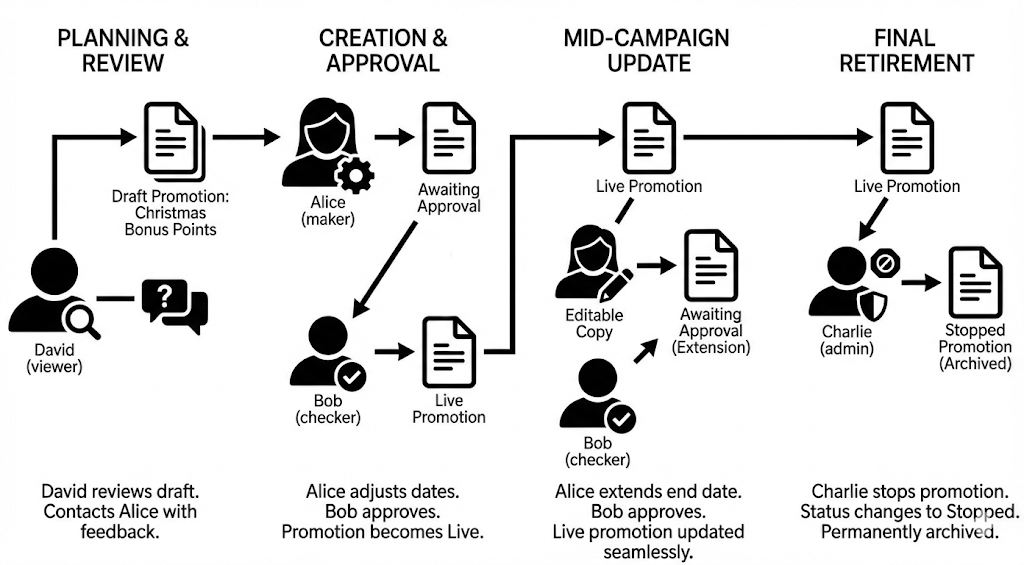
Use case: Lifecycle of the "Christmas Bonus Points" promotion
Roles involved:
David (viewer): Regional Marketing Manager
Alice (maker): Loyalty Program Specialist
Bob (checker): Head of Loyalty
Charlie (admin): System Administrator
Planning and review (the viewer's role)
The marketing team has a plan for a new "Christmas Bonus Points" promotion, which has been saved as a draft for visibility.
- David (viewer) logs in to review the loyalty promotion. He can see the draft of the "Christmas Bonus Points" promotion, but has no permissions to edit it.
- He notices the proposed start date conflicts with another event. Because he cannot make changes himself, he contacts the promotion's owner, Alice, with his feedback.
- Result: The viewer role allows key stakeholders like David to stay informed and provide essential feedback without having the ability to make potentially disruptive changes to the loyalty promotion.
Creation and initial approval (maker & checker)
Alice receives the feedback and prepares the promotion for launch.
- Alice (maker) opens the draft, adjusts the start date based on David's feedback, and verifies all other rules are correct.
- She selects Send for Approval. The promotion status changes to Awaiting Approval.
- Bob (checker) gets a notification to review the submission. He examines the promotion's details, sees that the dates are now correct, and is satisfied with the configuration. He clicks Approve.
- Result: The promotion is now live and will become active on its scheduled start date.
Mid-campaign update (maker & checker)
The promotion is a success, and the team decides to extend it by one week.
- Alice (maker) finds the live promotion and selects Edit Promotion. This creates a separate, editable copy, while the original continues to run.
- She changes the end date in the new draft and selects Send for Approval.
- Bob (checker) reviews the single change, the extended end date, and selects Approve.
- Result: The new end date is merged into the live promotion, seamlessly extending the promotion without any downtime.
Final retirement (admin's role)
The extended promotion period is now over. To formally close it out and ensure it cannot be accidentally reactivated, a final action is required.
- Charlie (admin) logs in to perform a system cleanup at the end of the quarter. He filters for all promotions that have ended.
- He selects the "Christmas Bonus Points" promotion and selects the Stop button. This is a permanent, irreversible action that only admins can perform.
- Result: The promotion's status changes to Stopped. It is now permanently archived and can no longer be edited, resumed, or evaluated.
Updated 1 day ago