
API request (http_write) block
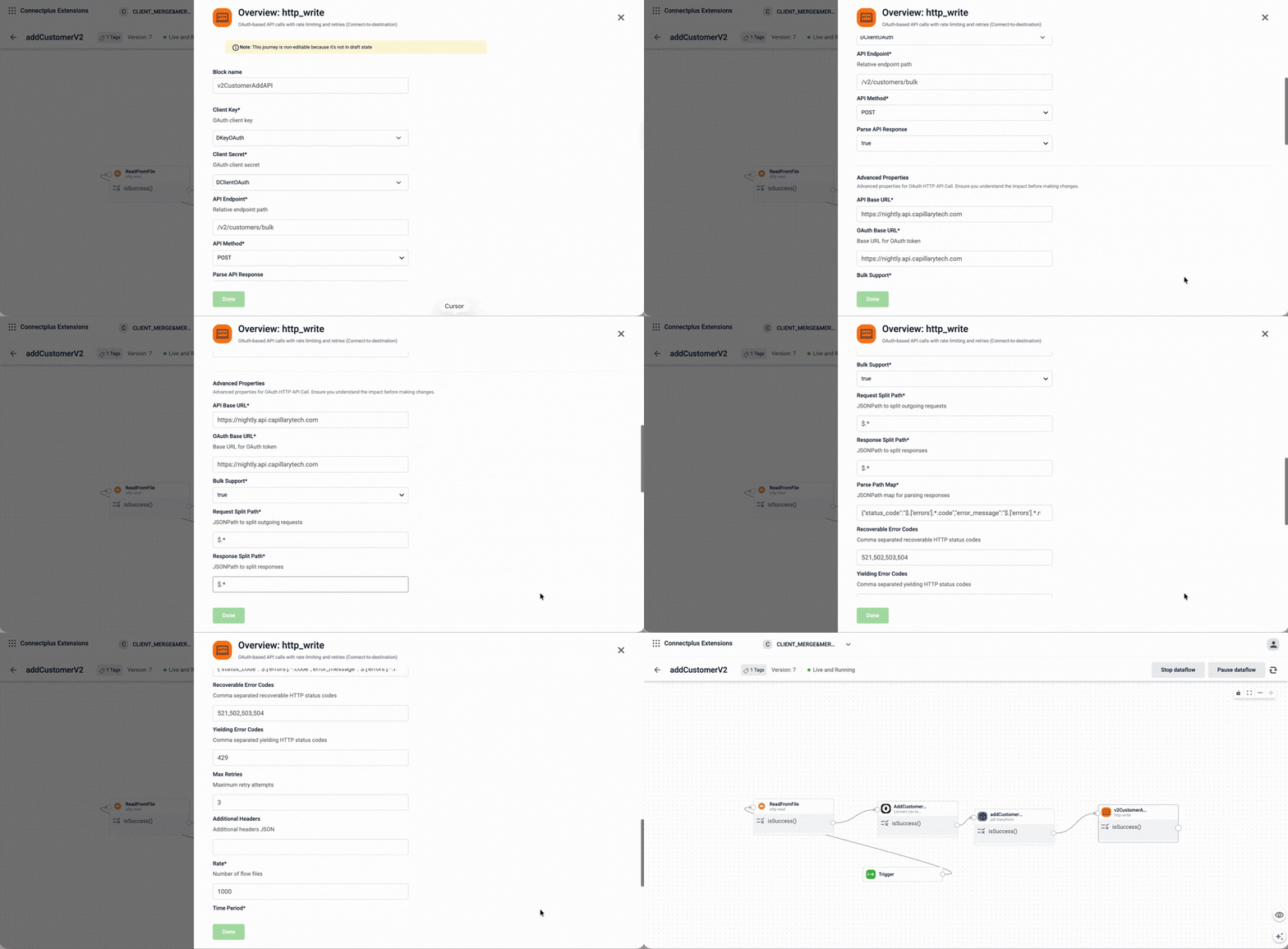
The http_write block sends data to an external HTTP API endpoint using OAuth-based authentication as a destination block in a Connect+ dataflow. It supports rate limiting, configurable retry logic, and response parsing. The block is typically used to post process data to Capillary or third-party APIs.
When to use this block
Use this block when your dataflow needs to deliver data to an HTTP API, for example, posting transactions to the Capillary Transaction v2 API.
Prerequisites
Before configuring this block, make sure you have:
- OAuth client key and secret
- The API endpoint path
- The HTTP method required by the API (
POSTorPUT)
Standard properties
| Field name | Required | Description |
|---|---|---|
| Block name | Yes | A name for the block instance. The name must be alphanumeric. There is no character limit. |
| Client Key | Yes | The OAuth client key used for authentication. Select the client key from the dropdown. The list shows configurations created in the Extension Configuration section of the Dev Console. |
| Client Secret | Yes | The OAuth client secret used for authentication. Select the client secret from the dropdown. The list shows configurations marked as secret in the Extension Configuration section of the Dev Console. Note: When creating a password configuration in the Extension Configuration section of the Dev Console, set |
| API Endpoint | Yes | The relative endpoint path of the API to call. For example, /v2/transactions/bulk.For Neo endpoints, use the format /x/neo/<neo_dataflow_name>. To insert a path parameter populated at runtime, use $attributeName, where attributeName is a variable declared in the Attributes property of the JSLT block. For example, if you declared a userId attribute, enter /v2/customer/$userId.Note: - Attributes referenced here must be declared in the JSLT block. If an attribute is not declared in the JSLT block, you cannot use it here. - Do not append query parameters manually using ? in the API URL. Connect+ automatically appends the configured query parameters when sending the request. |
| API Method | Yes | The HTTP method used to call the API. Select POST or PUT from the dropdown.Default value: POST. |
| Parse API Response | No | Parses the API response after each request and extracts specific values using the Parse path map. Select true to extract values from the response.Select false to skip response parsing.When set to true, the parse path map defines which fields to extract from the response:
true.Set the value to false for Neo APIs. |
Advanced properties
⚠️ Advanced properties for OAuth HTTP API Call. Make changes only if you know what you are doing.
| Field name | Required | Description |
|---|---|---|
| API Base URL | Yes | The base URL of the API. You can use the default value. If you enter a URL, do not include a trailing /.Default value: {intouch_url}. |
| OAuth Base URL | Yes | The base URL used to obtain the OAuth token. You can use the default value. If you enter a URL, do not include a trailing /.Default value: {intouch_url}. |
| Bulk Support | Yes | Determines whether bulk API calls are supported. Select from the dropdown. Select false when the target API expects individual objects.Select true when the target API expects an array.Default value: true. |
| Request Split Path | Yes | The JSONPath expression used to split outgoing requests. Default value: $.*. |
| Response Split Path | Yes | The JSONPath expression used to split API responses. Default value: $.*. |
| Parse Path Map | Yes | The JSONPath map used to parse API responses. Default value: {"status_code":"$.[errors'].*.code","error_message":"$.[errors'].*.r..."}. |
| Recoverable Error Codes | No | Comma-separated HTTP status codes that trigger a retry. Default value: 521,502,503,504. |
| Yielding Error Codes | No | Comma-separated HTTP status codes that cause the block to yield and wait before retrying. Default value: 429. |
| Max Retries | No | The maximum number of retry attempts on failure. Default value: 3. |
| Additional Headers | No | Additional HTTP headers to include in the API request, entered as a JSON object. For example, {"X-Custom-Header": "value"}.To reference an attribute declared in the JSLT block, use $attributeName. For example, {"X-Cap-Id": "$userId"}.Note: Attributes referenced here must be declared in the JSLT block. If an attribute is not declared in the JSLT block, you cannot use it here. |
| Rate | Yes | The number of flow files processed per time period. Default value: 1000. |
| Time Period | Yes | The duration of the rate-limiting time window. Default value: 1. |
| Time Unit | Yes | The time unit for the rate-limiting period. Select SECONDS, MINUTES, or HOURS from the dropdown.Default value: MINUTES. |
Updated 29 days ago