
Overview
What Connect+ is, what you can do with it, and how it compares to Data Import.
Connect+ is Capillary's no-code data integration tool. It lets you bring data into the Capillary platform from an FTP or SFTP location, export data from Insights to any FTP location, and automate a wide range of data operations without writing code or relying on developer support.
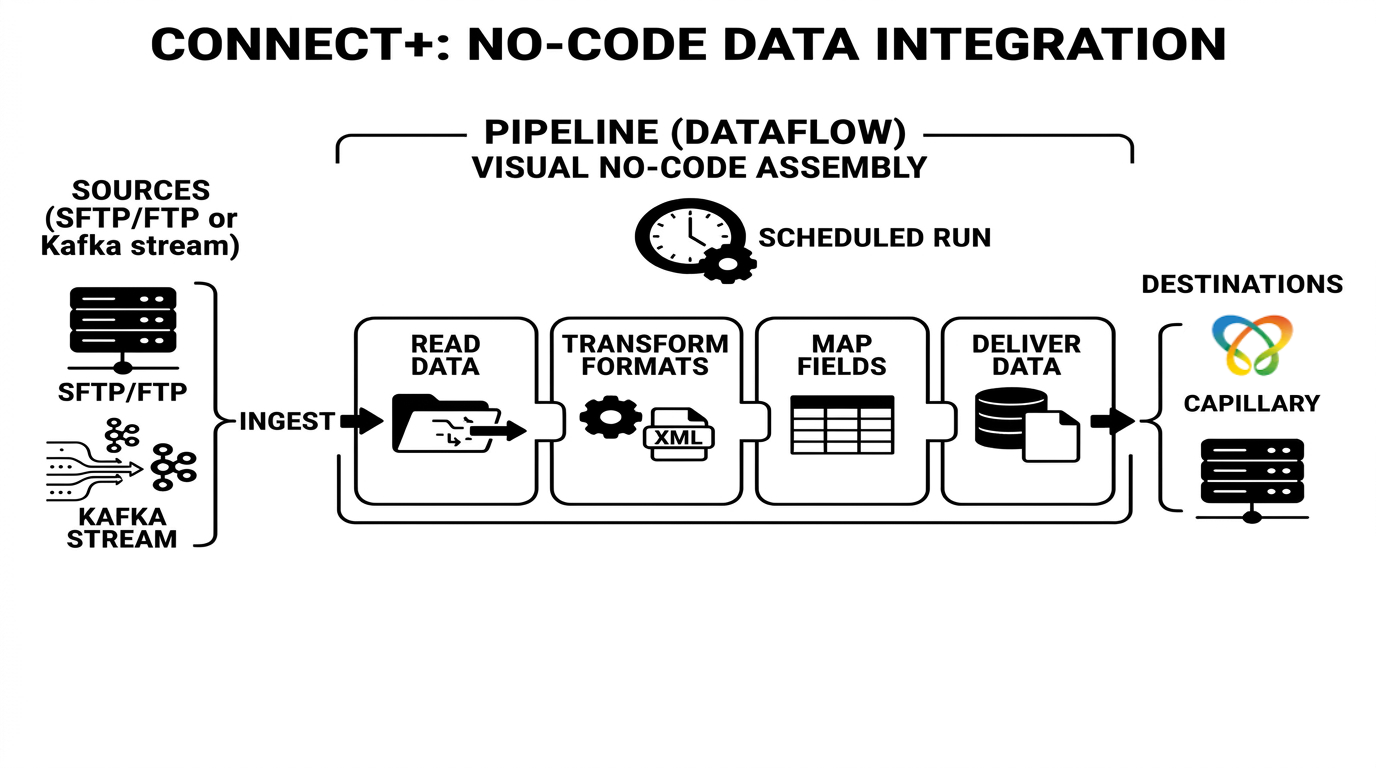
At its core, Connect+ is built around a dataflow. A dataflow is a defined sequence of steps, or a pipeline, that reads data from a source, transforms it, and delivers it to a destination. You compose a dataflow visually by assembling blocks on a canvas. Each block performs a specific function, such as reading a file, converting a format, or calling an API.
Once live, the dataflow runs automatically based on a schedule or trigger you define.
Connect+ provides ready-to-use templates for common integration patterns. You can copy a template into your organization using aiRA Coder, configure it for your specific requirements, and take it through the standard approval process before making it live. This removes the need to build frequently used pipeline structures from scratch.
Here is an example of how Connect+ works. An Add Transaction dataflow connects to an SFTP server, picks up transaction CSV files, decrypts them if needed, maps the CSV columns to the Capillary Transaction API fields, and posts the data on a schedule.
What Connect+ does
Connect+ lets you define dataflows: structured sequences of steps that collect data from a source, transform or process it, and deliver it to a destination. Each dataflow is assembled from pre-configured blocks that handle specific tasks such as connecting to an FTP server, transforming headers, calling a Capillary API, or scheduling a run.
You can use Connect+ to:
- Ingest data from FTP or SFTP into the Capillary platform on a schedule, for example customer registrations, transaction additions, and points operations.
- Export data from Capillary to an FTP location in the format your downstream systems require.
- Transfer files between FTP servers with header remapping, encryption, and decompression.
- Merge line-level and bill-level files and ingest the combined result in a single operation.
- Raise bulk requests such as PII deletions or goodwill points issuance.
- Convert data between formats, for example from CSV to XML.
Built on Neo
The Neo extension platform powers Connect+. Neo is Capillary's low-code, drag-and-drop environment for building data workflows. The blocks you configure in a Connect+ dataflow are Neo building blocks executing on the Neo runtime.
This architecture means:
- Dataflows in Connect+ follow the same version-controlled lifecycle as Neo dataflows, moving through Draft, Awaiting Approval, Approved, and Live states.
- You can use aiRA Coder, Neo's built-in AI assistant, to generate or modify Connect+ dataflows using natural language prompts.
- Neo Transformer blocks inside a Connect+ dataflow can invoke other Neo dataflows for advanced data transformation.
- Platform-level observability for Connect+ is available through the Dev Console alongside Neo metrics.
Key features
No-code dataflow builder
Build and configure integrations using a visual drag-and-drop canvas without writing code or requiring developer support. Select a pre-built template, fill in the block details for your environment, and deploy.
AI-assisted dataflow creation
Use aiRA Coder, Neo's built-in AI assistant, to generate or modify Connect+ dataflows using natural language prompts. Describe the operation you want to perform and aiRA Coder builds the dataflow structure for you.
Broad template library
Choose from a wide selection of pre-built templates covering common use cases such as customer registration, transaction ingestion, goodwill points issuance, file transfer, audience reload, and data reconciliation.
Version control
Maintain multiple versions of a dataflow, including Draft, Awaiting Approval, Approved, and Live states. The system captures metadata to track who made modifications, so you can update or revert configurations safely.
Centralised configuration management
Securely store sensitive credentials such as hostnames and passwords using the Extension Manager in Dev Console. When a password changes, use the Sync feature to update the configuration across all dataflows in a single step.
Built-in scheduling
Configure dataflows to run at defined intervals. The minimum triggering interval is 5 minutes. You can also schedule runs hourly, daily, or at a specified time.
Flexible execution control
Use the Pause option to stop picking up new files while allowing files that are currently processing to finish. Use Stop to halt all processing immediately.
Encryption and decryption
Decrypt encrypted source files as part of the ingestion process and encrypt output files before they are written to the destination, using algorithms such as PGP.
Proactive alerting
Send an email when a dataflow encounters a problem, so you don't have to monitor the performance dashboard manually. Default alerts activate automatically for every dataflow, while custom alerts let you define your own thresholds for conditions.
Error visibility and reporting
View error summaries, block-level errors, and detailed logs in the Dev Console. You can access the Dev Console directly from the Connect+ UI. Error reports are retained for up to 30 days. Automatic alert emails are sent for certain issues, and you can customize alerts for others.
Data reconciliation
Compare source files with output files to identify missing or unprocessed events and take corrective action.
How Connect+ differs from standard data import
Both Connect+ and the standard data import feature bring data into Capillary. However, they are built for different purposes and suit different scenarios.
Standard data import
Data import is a structured, profile-based upload tool built into InTouch. It provides a governed, guided experience for importing specific types of data such as customers, transactions, points, and slabs using pre-defined import profiles. It is suited for straightforward, one-time or periodic uploads where the data is already clean and conforms to Capillary's expected format.
Connect+
Connect+ is a pipeline builder. It is designed for scenarios where data needs to be transformed before it reaches Capillary, where ingestion needs to happen continuously or in near real time, where errors need to be caught and reported at a granular level, or where the flow involves multiple steps and integrations beyond writing to Capillary.
The table below summarises the key differences.
| Capability | Connect+ | Standard data import |
|---|---|---|
| Primary use case | Scheduled or recurring data ingestion with transformation | One-time or periodic upload of clean, pre-formatted data |
| API usage | Calls Capillary v2 APIs, triggering loyalty rules and Dynamic Vouchering System | Writes directly to the CDP database and does not trigger loyalty rules or Dynamic Vouchering System |
| Data transformation | Supports header mapping, field reordering, JSLT scripting, and format conversion | No data manipulation or transformation during transfer |
| Error visibility | Per-record error logs, block-level statistics, and email reports | Limited error visibility |
| Data reconciliation | Compares source file against CDP data to identify missed events | Not supported |
| Kafka streaming | Native support for consuming Kafka topics in real time | Not supported |
| Versioning | Full version history with approval workflow and rollback | Not supported |
Connect+ does not replace Data Export. Instead, it extends Data Export by handling last-mile operations that Data Export cannot perform on its own, such as format transformation, file merging, and conditional routing to a second SFTP destination.
Updated 3 months ago