
Configure Points Contribution and Deduction
Configure earning, allocation, expiry, and redemption rules for a group wallet.
This page covers how to configure earning, allocation, expiry, and redemption rules for a group wallet in Loyalty+. For an explanation of how group points work conceptually, see the introduction section.
Configuring earning and allocation rules
By default, a transaction issues points both to the member's individual wallet and their associated group's wallet. To direct points to just the group wallet instead, configure a mutually exclusive workflow in Loyalty+. This ensures a single transaction credits either the group wallet or the personal wallet, but not both.
Prerequisites
Before you begin, confirm the following prerequisites are in place:
- User group loyalty is enabled for your organization.
- A transaction-level extended field exists (for example,
member_card_swiped) with valuesYesandNo. - Your POS or API integration passes this extended field in the
AddTransactionpayload:Yesfor a group transaction,Noor null for a standard individual transaction.
To configure the workflow:
- Go to Loyalty+ > Programs and select your program.
- Select Edit Program, then open the Workflows tab.
- Create a new workflow condition triggered by the TransactionAdd customer activity, or edit an existing one.
- In the Expressions box, add the following condition for individual transactions:
currentTxn.extField_membership_card_swiped=="No" || currentTxn.extField_membership_card_swiped.isNull( )In the above expression example, membership_card_swiped is the extended field enabled for identifying user group related transactions.
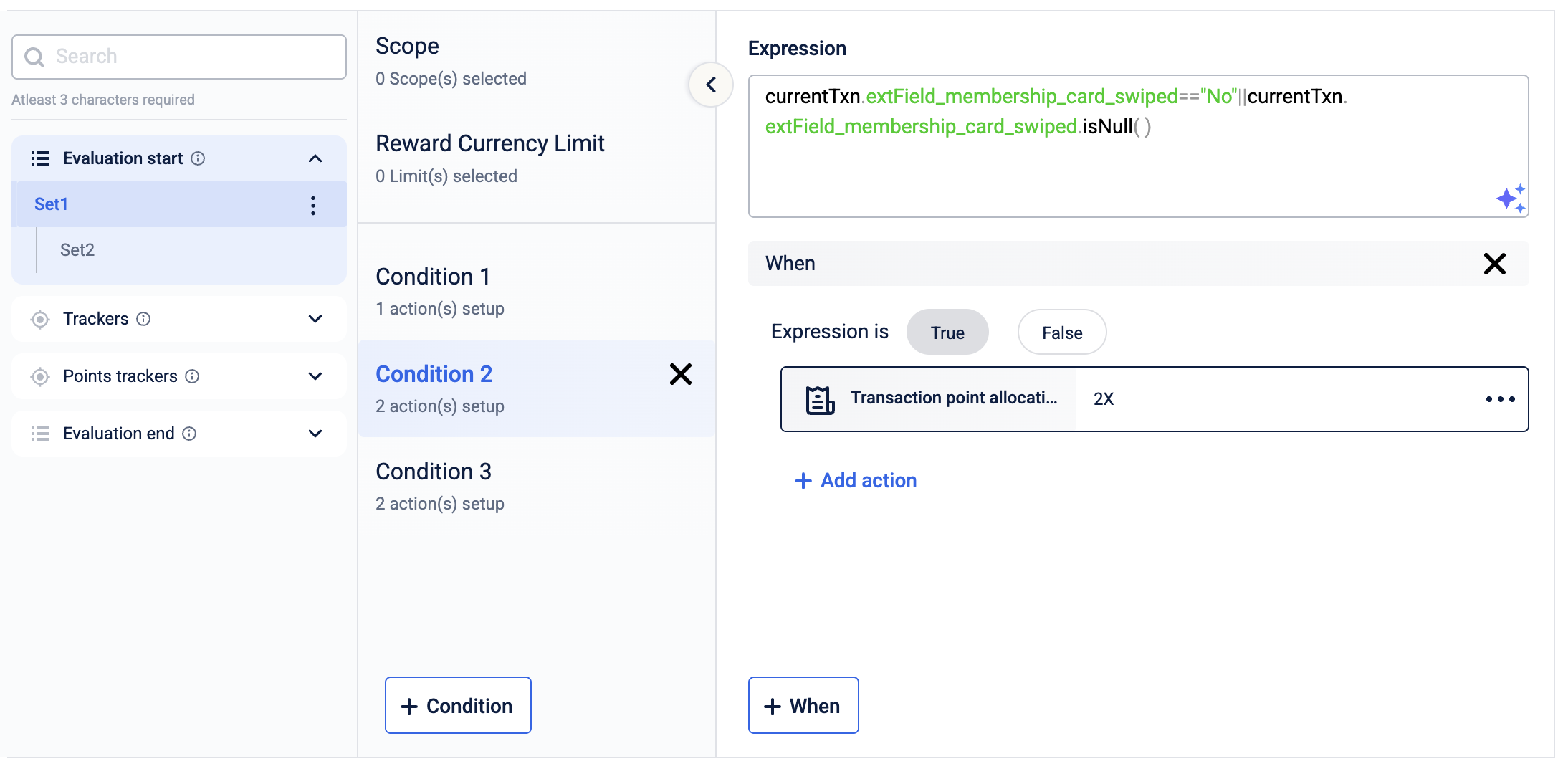
- Add a Transaction points allocation action and set User entity to Individual.
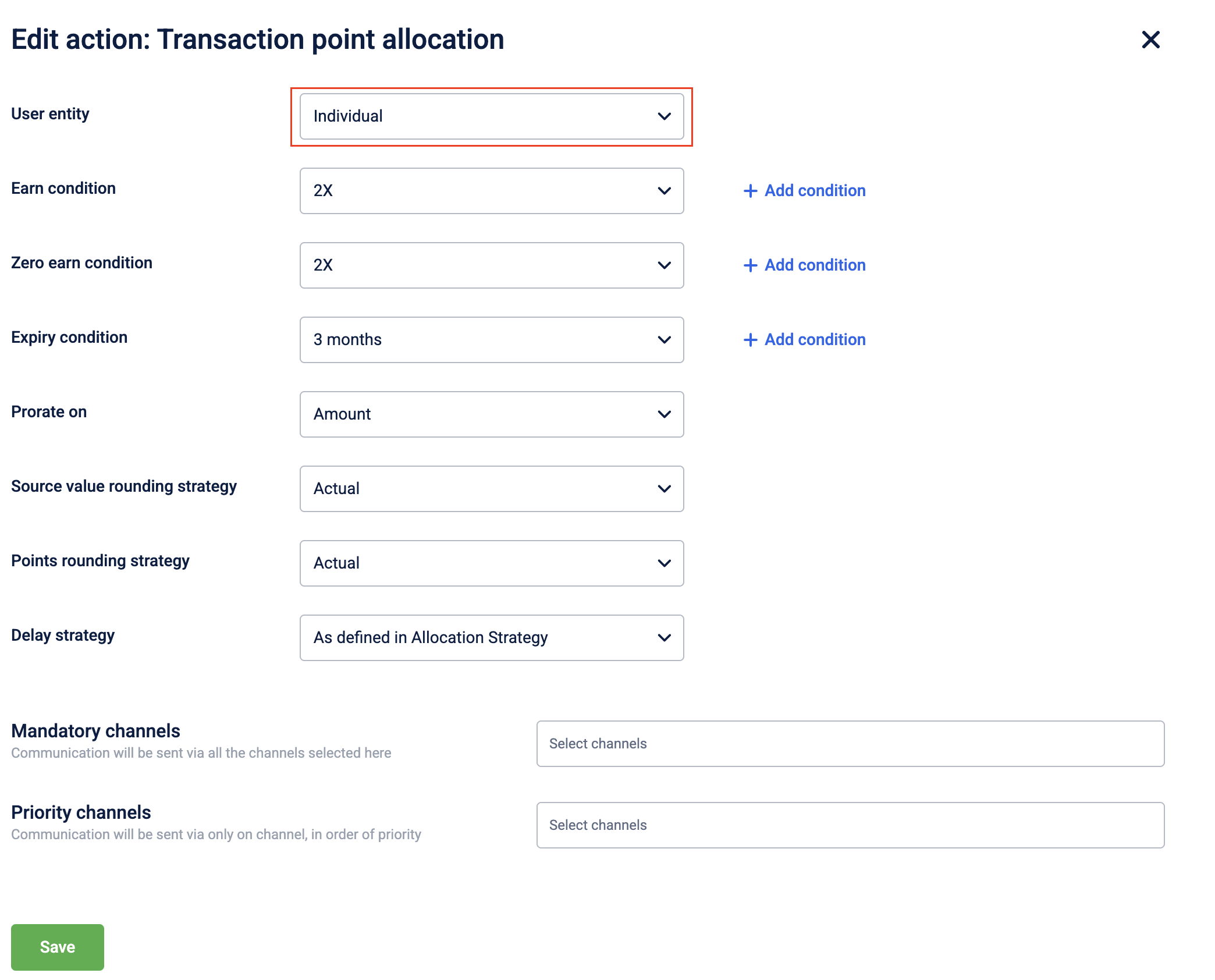
-
Create a second condition, also triggered by TransactionAdd.
-
In the Expressions box, add the following condition for group transactions:
currentTxn.extField_membership_card_swiped=="Yes"In the above expression example, membership_card_swiped is the extended field enabled for identifying user group related transactions.
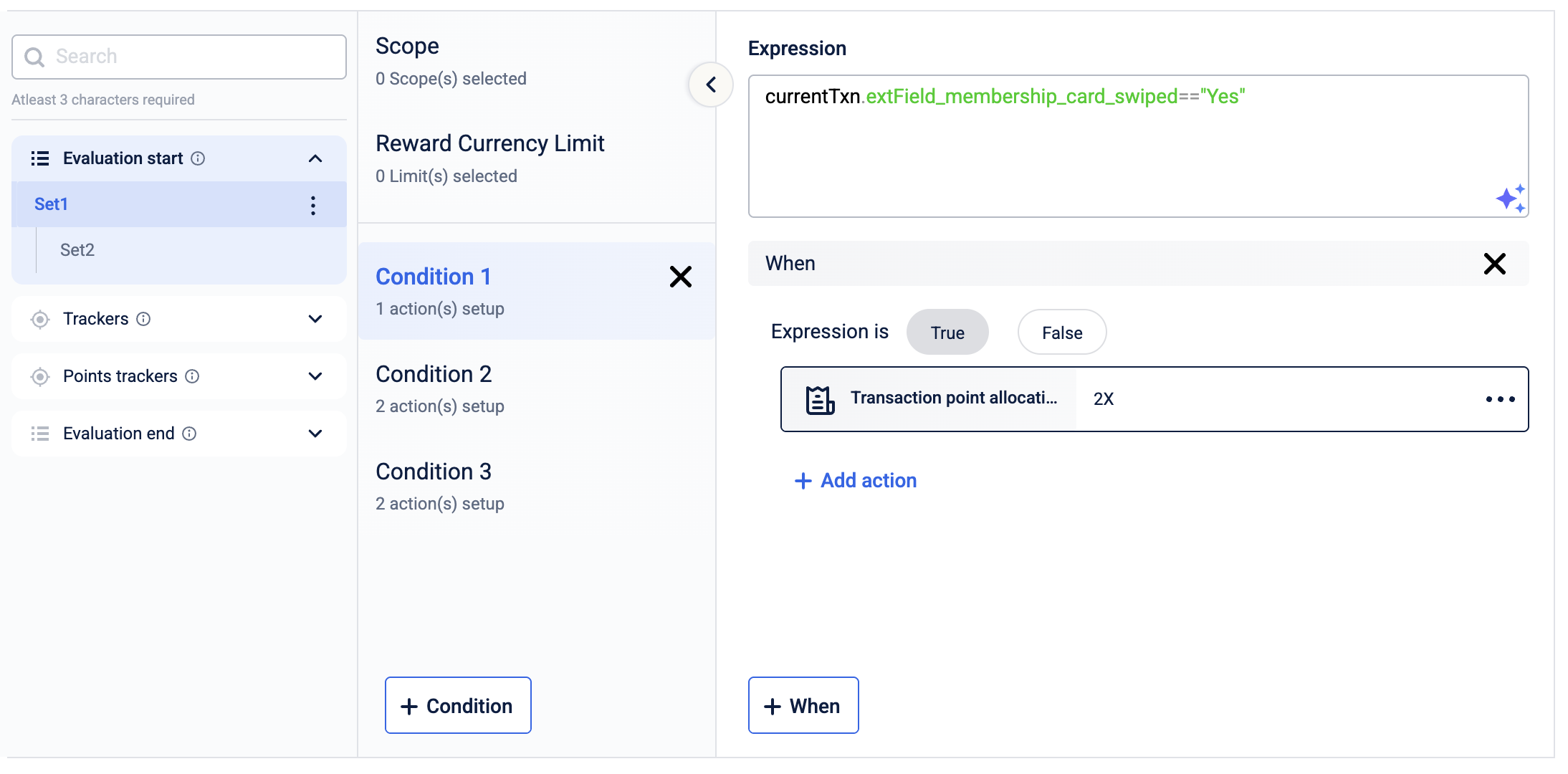
- Add a Transaction points allocation action and set User entity to User Group.
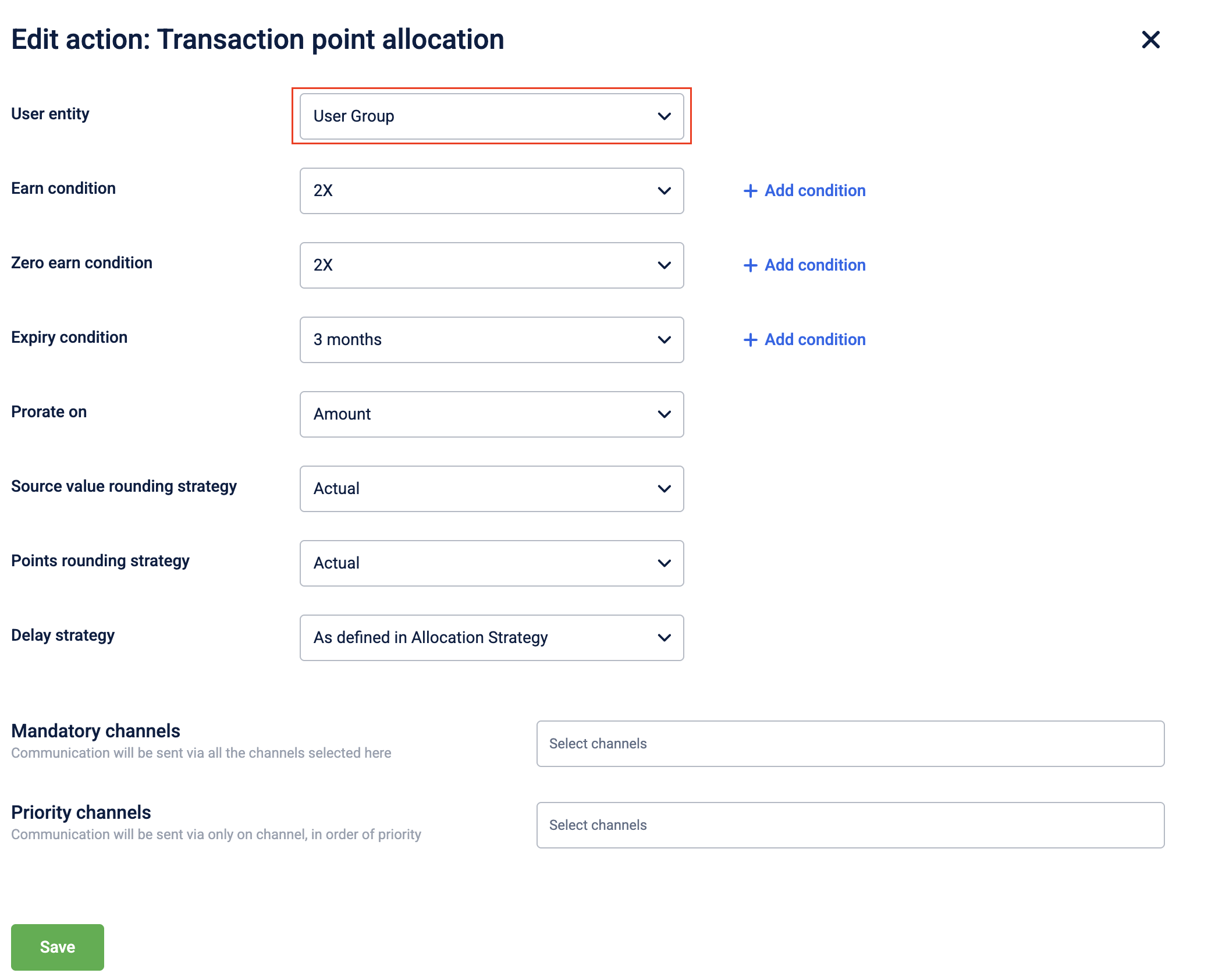
- Select Save and Continue, then Publish changes to activate the workflow.
Once earning rules are in place, configure expiry conditions to control how long group points remain valid.
Configuring currency expiry
Point expiry for group wallets can follow the same rules as individual expiry or use a separate configuration, depending on your program's needs. Both approaches are configured under the action in the Workflows section.
For fleet programs, enabling FLEET_GROUP_LOYALTY_ENABLED and setting the FLEET_ENTITY_TYPE parameter activates expiry logic for fleet group users. This applies to all group loyalty programs using the fleet construct.
For details on configuring expiry conditions in workflows, refer to the Expiry Conditions documentation.
With expiry defined, configure redemption rules to control how and when members can spend group points.
Configuring redemption rules
To enable point redemption at the group level in a Multi-Loyalty Program (MLP) environment, the ENABLE_GROUP_PROGRAMS_REDEMPTION flag must be active for your organisation. Without this flag, redemption API calls at the group level will fail regardless of member permissions. To enable this, raise a JIRA ticket to the Capillary product support team.
If your organisation uses a single loyalty program (not MLP), this flag is not be required.
Redemption permissions are controlled at the member level:
- Primary members can always redeem from the shared wallet.
- Secondary members can redeem only if the
allow_points_redemptionpermission is granted at join time. - To restrict a member from redeeming, pass
block_points_redemptionin as the permission when adding them to the group.
In environments with multiple programs, you can also track group points separately per program.
Tracking points per program
In a Multi-Loyalty Program (MLP) environment, you can configure the system to calculate and track group points separately per program rather than as a single combined total. When enabled, each program maintains its own independent points balance for the group.
Example: A group has members enrolled in Program A and Program B. Points earned via Program A transactions are tracked in the Program A group wallet, and points from Program B go into the Program B wallet. Redemptions draw from the respective program wallet, not a combined pool.
Enable the CONF_ENABLE_GROUP_POINTS_BY_PROGRAM flag by raising a JIRA ticket to the Capillary product support team.
Beyond earning and redemption, points can also be moved manually between individual accounts and group wallets.
Transferring points
Points can be transferred between individual accounts and group wallets using the Transfer Group Points API (POST /v2/points/userGroup2/transfer). The following transfer directions are supported:
- Individual to Group
- Group to Individual
- Group to Group
To target a group wallet as the destination, set "type": "USERGROUP2" in the toEntity object. Without this, the transfer defaults to an individual account.
Example request (individual to group):
{
  "pointsTobeTransferred": 100,
  "programId": 973,
  "notes": "Transferring points to group wallet",
  "transferredBy": {
    "identifierType": "id",
    "identifierValue": "565345942",
    "source": "INSTORE"
  },
  "toEntity": {
    "type": "USERGROUP2",
    "identifierType": "id",
    "identifierValue": "3847940",
    "source": "INSTORE"
  },
  "fromEntity": {
    "type": "CUSTOMER",
    "identifierType": "id",
    "identifierValue": "565345942"
  }
}
Notes:
- Points aren't transferred automatically when members move between groups. Handle point transfers separately before initiating any member transfer.
- The
transferredByfield must identify the same customer asfromEntity. You cannot initiate a transfer on behalf of another member.
Updated 4 months ago