
Introduction
A user group (also called UserGroup2 in the backend) is a collective loyalty entity with its own unique ID, wallet, and transaction history. The combined purchases of members drive its activity. User Group Loyalty lets you unify the loyalty journeys of multiple customers into a single, collective entity. Instead of customers earning rewards independently, members contribute to a shared goal through a common group wallet.
Example: A trucking company enrols as a group. Each time a driver refuels, loyalty points are credited to the company's shared account rather than the driver's personal wallet. The fleet owner accumulates points from all drivers and redeems them for a fleet oil change.
Key features
- Group-based rewards: Incentivise groups of customers, such as entire teams, families, or organizations
- Shared wallet: Reward currency (points and alternate currencies) is pooled from multiple customers into a single, shared wallet.
- Hierarchy management: Create and manage simple household groups to complex organisational structures.
- Role-based access control: Control which members can redeem or transfer points.
Types of user groups
User Group Loyalty can be of two types, depending on the nature of the business relationship:
B2C: Friends and family groups
A friends and family group is a simple, consumer-facing group in which members, typically family members or friend groups, pool their rewards for shared benefits. One member serves as the primary account holder, while others contribute their spending toward a common wallet.
Example: A family of four links their accounts to a single group. All purchases by any family member contribute to a shared points pool that anyone in the family can redeem.
B2B: Business groups
Business groups are for corporate or commercial relationships. This is an advanced group that is structured around business roles rather than personal relationships. These have defined roles with permissions for each role. Members who join are assigned a role based on which they can redeem or transfer user group points. This can be done by defining a hierarchy and assigning roles to individual members.
Examples:
Teams: Employees or team members within a company earn points that roll up into a shared team wallet, which can be redeemed by the team lead or administrator.
Buyer Groups: A network of buyers, distributors, or franchisees where purchases by individual outlets or members contribute to a shared group account managed by a head office or administrator.
Fleet: A fleet of vehicles, such as delivery trucks who contribute to a shared wallet. A fleet owner registers as the primary entity. Individual drivers are secondary members. Each refuelling transaction by a driver credits the fleet owner's group wallet. The fleet owner manages redemption for the group.
How a group is structured
A user group is a distinct entity with its own Group ID. This means a group can hold a wallet and a transaction history independently, just like a customer.
Membership roles
Every group has a defined membership hierarchy with two types:
| Role | Access level | Responsibilities |
|---|---|---|
| Primary Member | Full admin | Earn, redeem and transfer user group points. |
| Secondary Member | Contributor | Earn user group points. Redeem and transfer user group points based on permissions. |
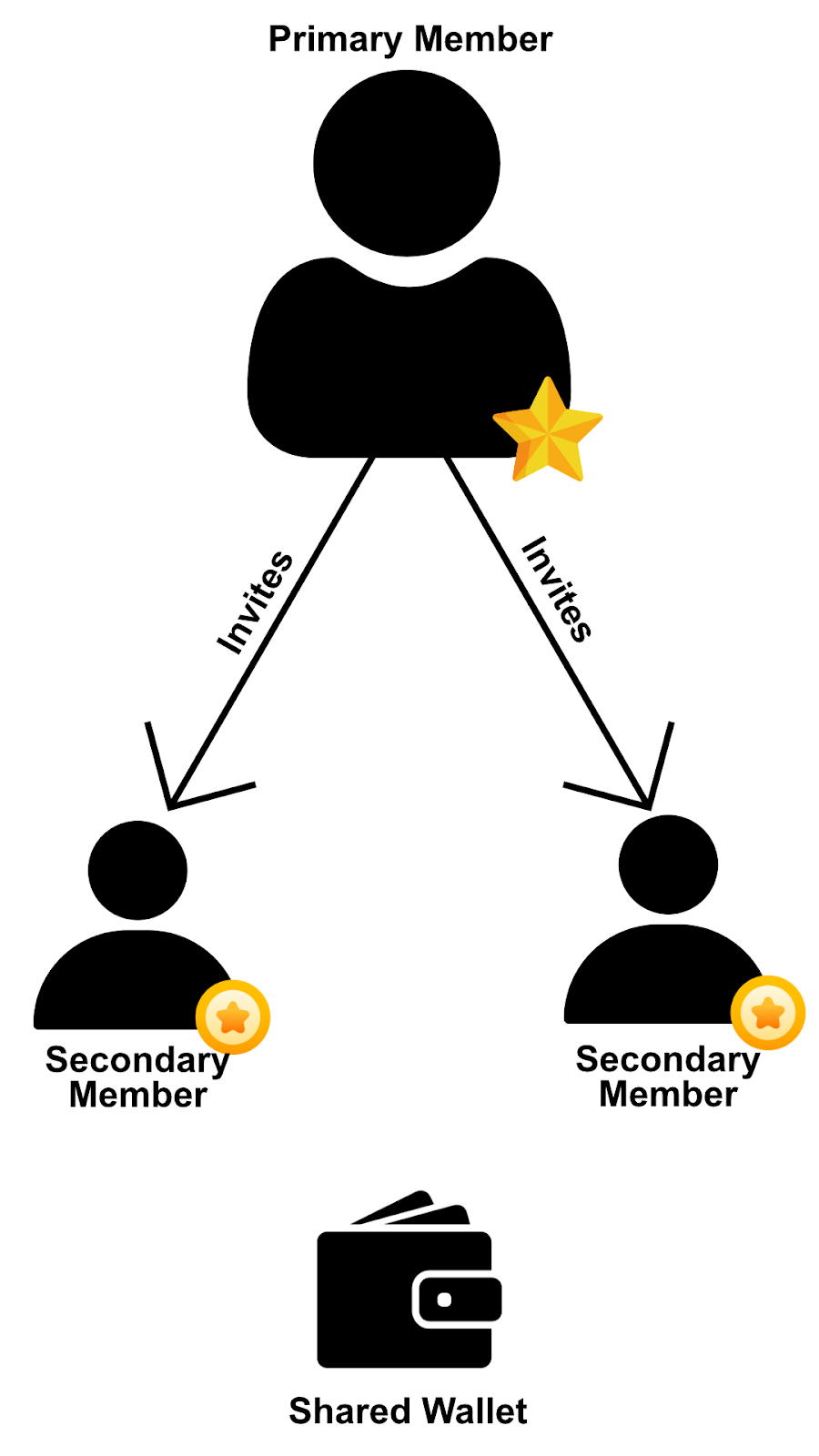
Each role comes with a set of permissions that govern what members can do with the shared wallet.
Member permissions
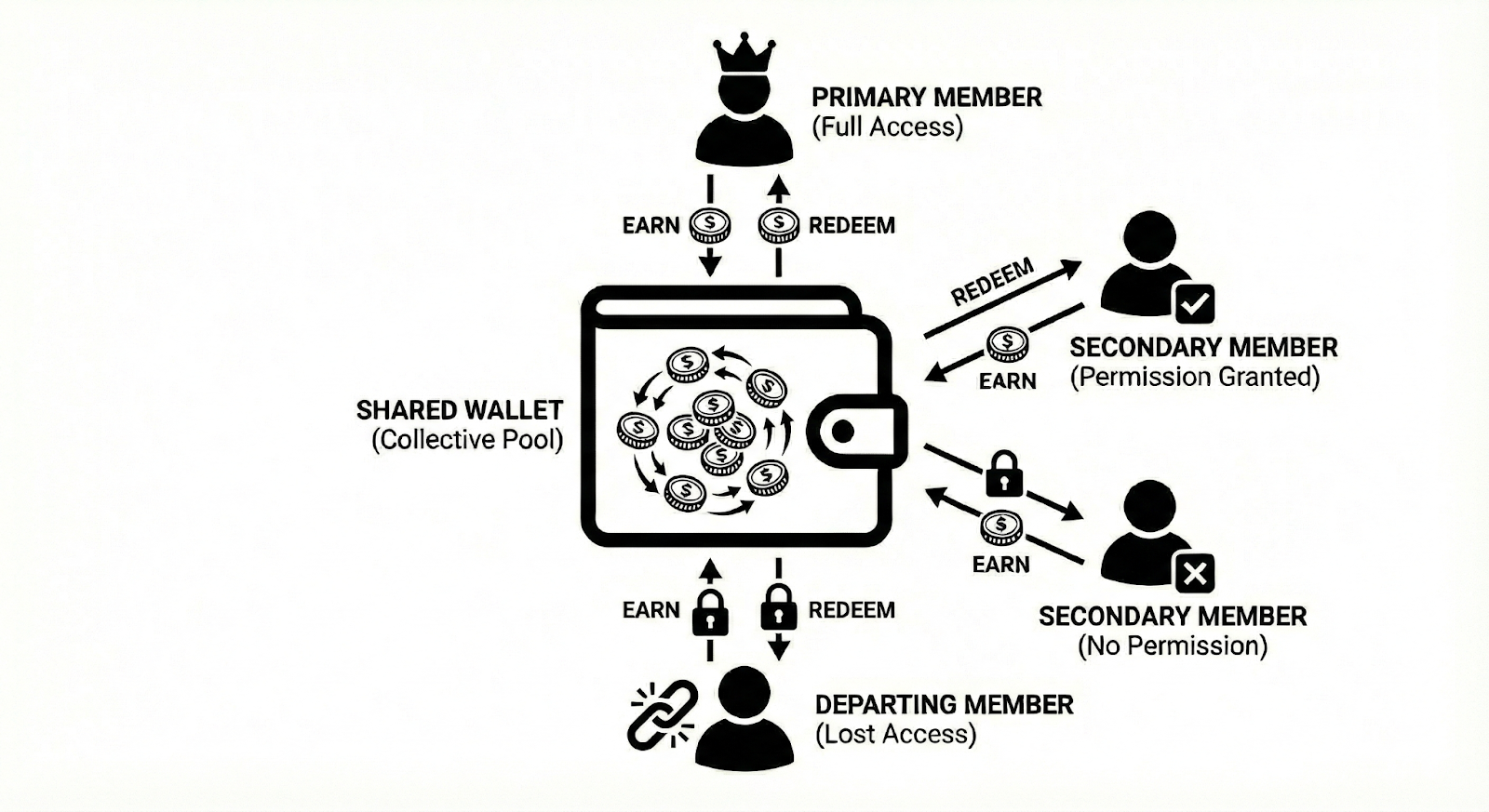
Permissions are assigned per member when they join the group and control what they can do with shared resources. The primary member has administrator permissions and has all permissions. The following permissions areavailable for secondary members:
- Redeem Points: Spend reward currencies from the collective group wallet.
- Transfer Points: Move points out of the group wallet to other entities or individual accounts.
Example: A secondary member without redemption permissions cannot redeem points even if the group wallet has a positive balance.
These permissions apply across the wallet models available for user groups.
Wallet models
A group can be configured with either a single shared wallet or a dual wallet model, depending on how you want to handle individual and group earnings.
Single shared wallet
All earned points are deposited into one central group wallet. No per-member separation exists. Members with redemption permission can spend the full balance, regardless of how much they contributed.
With a single shared wallet configured, the following applies:
- Primary members can always redeem from the shared wallet.
- Secondary members can redeem only if they have redemption permissions.
- When a member leaves, they lose access to the shared wallet immediately. Any points they contributed remain in the group.
If you want members to also maintain personal wallets alongside the group wallet, use the dual wallet model instead.
Dual wallet
In dual-wallet mode, each member has a personal wallet and contributes to the group wallet simultaneously. A single transaction credits both wallets independently. This is the default behaviour.
With a dual wallet configured, the following applies:
- The personal wallet is exclusive to the member and isn't affected by other members' activity.
- The group wallet is a collective bonus pool, accessible to all members with redemption permission.
- When a member leaves, they keep their personal wallet balance but lose access to the group wallet. The remaining members still have access to the group wallet.
How points work in a group
When a member makes a transaction linked to the group, the resulting points are credited to the shared group wallet. The member who triggered the earn is recorded against each credit entry, so the group ledger is a full attribution trail of who contributed what.
Every credit and debit on the group wallet is visible in the Incentives tab of the group view in Member Care. Each entry shows the member's name, their primary identifier, their role, the store where the event occurred, and the net points impact. Redemptions show the member who performed them.
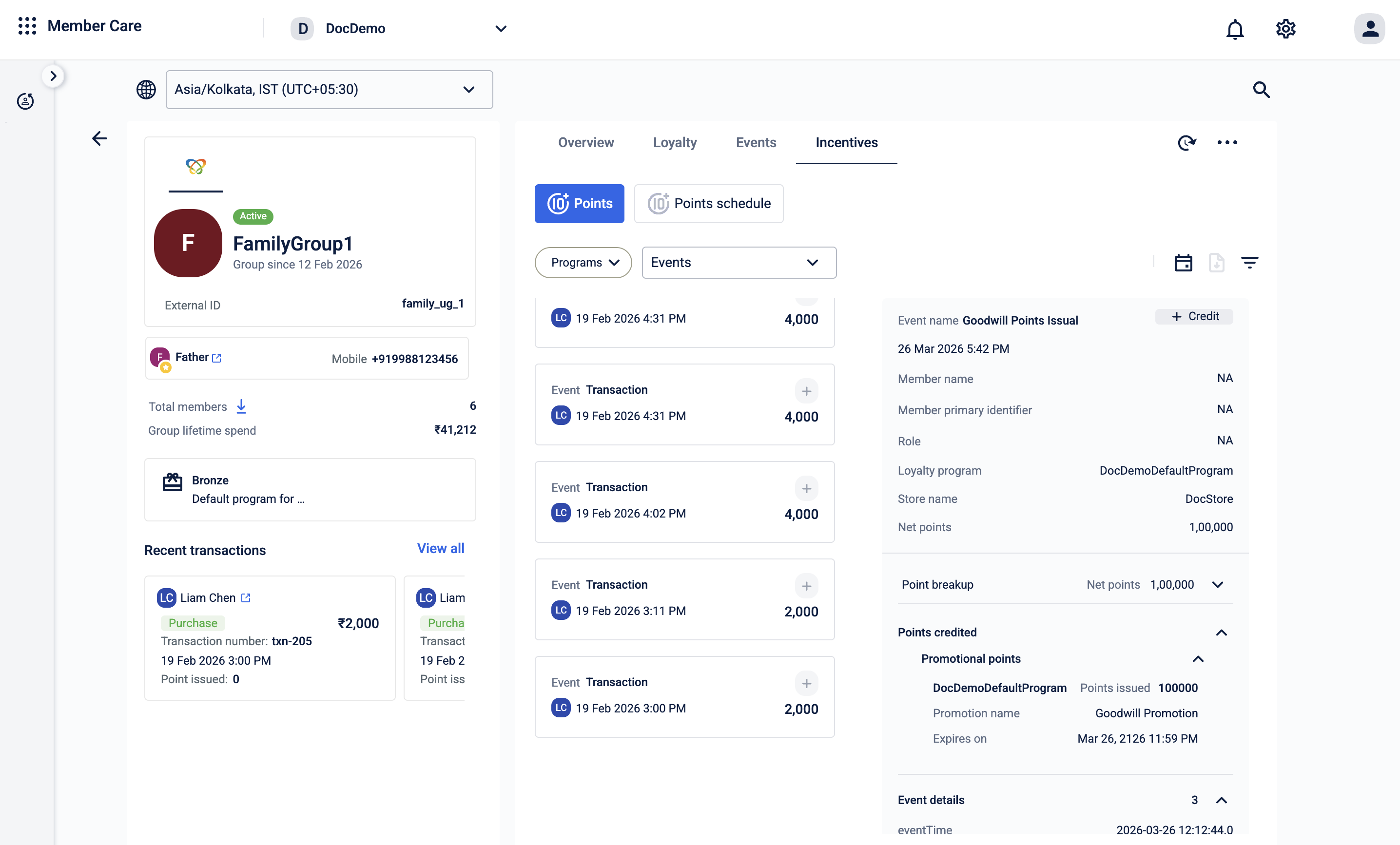
Because the wallet is shared with no per-member partition, any member with redemption permissions can spend the full available balance, regardless of their individual contribution.
Points can also be moved between individual accounts and group wallets in any direction: individual to group, group to individual, or group to group. See Transferring Points for more information.
What happens to the points when members leave
Member exits and group dissolution affect points, tiers, and wallet access in specific ways. How you configure deactivation determines what happens to a member's points and tier when they leave a group.
When a secondary member leaves
- They immediately lose access to the shared group wallet.
- Any points they contributed stay with the group they aren't returned to the individual.
- Their individual loyalty tier reverts to the base tier.
When the primary member leaves
The group is deleted when the primary member exits. Points in the group wallet stay with the group entity unless you explicitly transfer them via custom implementation before deactivation. All members lose their group tier benefits.
Negative balances
A group wallet can go into a negative balance. This happens when a member earns points, another member redeems them, and the first member then returns the original purchase, triggering a reversal. Because the points were already spent, the reversal pushes the balance below zero. This is expected behavior in a shared-wallet model.
When members leave the group, points and wallet access are affected based on how deactivation is configured.
Updated 4 months ago